Hi,
I save articles on my Raindrop account.
I have a scenario that publishes the article somewhere from Raindrop.
Sometimes I save many articles in very few times.
I want to publish each article every hour, not all at once.
My scenario runs every hour.
Lets say I save 5 articles in raindrop at 13:00 : A, B, C, D, E.
With my current configuration all articles would be published at 14:00 when the cycle runs.
What I want is:
- 14:00 publish A
- 15:00 publish B
- 16:00 publish C
- 17:00 publish D
- 18:00 publish E
How can I do that ?
Hey Pamela,
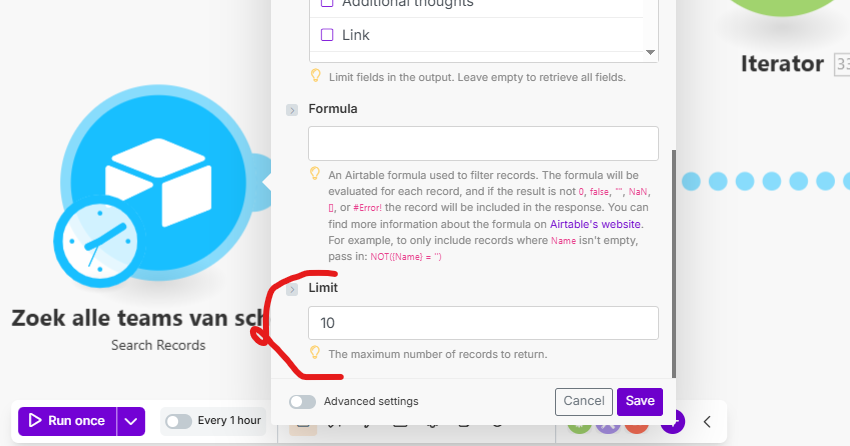
how is the scenario configured at the moment? Usually there is an option in the trigger to set the amount if entries you want to process.
yes, you are talking about the “limit” field.
But as far as I know, if I put “1” in that field, and if at the moment the cycle starts I have 5 articles saved in raindrop, Make will process only the first one and forget the 4 others. It is what I understand of that thread : If in one watch cycle a scenario finds multiple results. Will it run each one of them one by one?
If you are using the Raindrop.io “Watch Bookmarks” module —
Triggers when a new bookmark is created.
That’s a polling trigger. You won’t “lose” the unprocessed items— they will simply be worked with in a later scenario run.
For more information about the Watch Bookmarks module and Raindrop.io app, see the corresponding Integrations page and the Help Centre documentation.
You can also learn more about triggers in these Make Academy units:
Modules, scheduling and bundles
- Blueprints
- Different types of modules - search
- Different types of modules - action
- Introduction to triggers
- Scheduling your scenario
- Introduction to bundles
Hope this helps! If you are still having trouble, please provide more details.
— @samliew
1 Like
@Pamela1 yes your understanding is correct.
There are two action items to follow:
- Set the scenario run trigger to search Raindrop articles every 1 hour.
- Add a limit of 1 to the Raindrop article search.
With these settings, all saved articles will be published one by one.
For example, if you save 5 articles in Raindrop at 13:01, the publishing schedule will look like this:
- 14:00 publish A
- 15:00 publish B
- 16:00 publish C
- 17:00 publish D
- 18:00 publish E