Telegram autoposting: scenario runs but no messages are delivered (Drive → Telegram by Data)

:bullseye: What is your goal?

I want to understand why my Telegram scenario isn’t sending messages from Google Drive as expected.

:thinking: What is the problem & what have you tried?

Problem
Scenario runs (on schedule and via Run once) but no messages are delivered to either Telegram destination:
• Channel: @alivesilk
• Group/Club: -1001078073507
No explicit 4xx/5xx error in Execution Inspector; Telegram modules finish without a visible error and nothing appears in chats.

What we’ve tried
• Bot is admin in both chats; rights verified.
• Switched Telegram modules to Send by = Data and feed files from Google Drive → Download a file (Data, Name).
• Tested both paths: Send a video note (channel) and Send a photo (group).
• Simplified/disabled filters (router conditions set to always true) to avoid blocking bundles.
• Retried multiple Run once executions; also triggered by schedule.
• Tested with different media (JPG/MP4 from Drive), same result.
• Channel addressed by @username; group by numeric -100… ID.

Sample files used (for repro)
• Excel schedule: sandbox:/mnt/data/Autopost_Schedule_Dec_2025.xlsx
• MP4 sample 1: sandbox:/mnt/data/классической шелковой вышивки из Сучжоу (2).mp4
• MP4 sample 2: sandbox:/mnt/data/Живой Шелк (2).mp4

:clipboard: Error messages or input/output bundles

No explicit error shown in Execution Inspector.

Execution excerpts:

Module: Telegram Bot > Send a video note (channel)
Input:
{
“chat_id”: “@alivesilk”,
“send_by”: “data”,
“video_note”: “ Data>”,
“filename”: “ Name>”,
“caption”: “…”
}
Output:
{} // no message_id returned; nothing delivered

Module: Telegram Bot > Send a Photo (group)
Input:
{
“chat_id”: “-1001078073507”,
“send_by”: “data”,
“photo”: “ Data>”,
“filename”: “ Name>”,
“caption”: “…”
}
Output:
{} // empty result; nothing delivered

We don’t see any 4xx/5xx in the run. Please advise where to view the raw Telegram API response when a module finishes without an error but no message appears.
Screenshots attached: module settings + Execution Inspector (Output).

:camera_with_flash: Screenshots (scenario flow, module settings, errors)

Welcome to the Make community!

Can you please show us how you’ve mapped the variables in the Telegram modules?

Also, please format the JSON input/output bundles as code, otherwise they are made invalid by the forum. For more information on this, see below.


We’d love to help, however, we require more information that demonstrates the problem to help us reproduce the scenario and any issues and errors.

To allow others to assist you, please provide the following:

1. All Relevant Screenshots

We need to see what you’re working with to give you the best advice. Screenshots are important because Make is a visual editor — a picture provides us with more context.

It would help us identify the issue by having screenshots of:

  • the full scenario, and the zoomed in parts of the scenario that you are referring to (if your scenario is huge),
  • a full scenario run/execution from the history (showing output “speech” bubbles),
  • relevant module fields (showing how you’ve used any built-in functions, and how you’ve mapped the variables),
  • relevant filters between modules (showing which operators and any built-in functions you’ve used, and how you’ve mapped the variables),
  • relevant module input/output bubbles,
  • if applicable, any error messages,
  • and if applicable, any external services (spreadsheet headers/ sample data/ regex101.com/ etc. to show the item/ record exists, and is set up correctly).
Need help❓View instructions ◀

We would appreciate it if you could directly upload screenshots here instead of linking to them outside of this forum. This allows us to zoom in on the image when clicked, and also having improved privacy from third-party sources.

Taking Screenshots

  • Microsoft Windows: Take screenshots using the “Windows Snipping Tool”, by pressing either PrtSc or WinShiftS keys on your keyboard.
  • MacOS: Take screenshots by pressing CommandShift4 keys on your keyboard.

Uploading Attachments

  • Drag image files directly into the rich-text editor, or
  • Click on the upload button in the editor toolbar to select files:

2. Scenario Blueprint

Providing your scenario will allow others to quickly recreate and see how you have set up the mappings in each module, and also allows us take screenshots or provide module exports of any solutions we have for you in return. This would benefit you in implementing our suggestions as you can view screenshots of the changes or paste corrected modules back into your scenario.

Need help❓View instructions ◀

A. Export Blueprint

In the scenario editor, click the three dots at the top-right, then select “Export blueprint”.

  • You can upload files and images to this forum by clicking on the upload button:

    Uploading an attachment here will look like this:
    blueprint.json (12.3 KB)

B. Create Public Share Link

In the scenario editor, click on the Share button:

Read more about the scenario sharing feature in the Help Centre.

3. Properly-formatted Output Bundles from a Scenario Run

Please provide the input/output bundles of each of the relevant modules by running the scenario, or get the bundles from a previous run from the Scenario “History” tab.

Providing the bundles from a scenario run will allow others to replicate what is going on, especially if there are complex data structures (nested arrays and collections) and external services. This helps mapping the correct raw variable names from collections (instead of the label/display name).

Need help❓View instructions ◀

Click on the white speech bubbles on the top-right of each module and select “Download output (or input) bundles”.

A. Upload a Text File

Save each bundle contents in a plain text editor as a moduleNumber-output.txt file. Open the file to check if it has not added additional formatting or encoded the plain text.

  • You can upload files and images to this forum by clicking on the upload button:

    Uploading an attachment here will look like this:
    module1-input.txt (1.2 KB)
    module1-output.txt (3.4 KB)

B. Insert a Formatted Code Block

If you are unable to upload files on this forum, alternatively you can paste the bundles AND format them correctly.

:warning: Formatting IS Important! :warning:

Here are some ways to provide text content in a way that it won’t be modified by the forum.

  • Method 1: Type code fence manually
    Manually type three backticks ``` in a separate line before and after the content, like this,

    ```
    text goes here
    ```
    
  • Method 2: Highlight the pasted content, then click the preformatted text/code button

  • Method 3: Upload your file elsewhere and share the public link
    This method is only advised for large files exceeding the forum upload limit.

Sharing these details will make it easier for others to assist you, so that you can get better answers, faster.

Hope this helps! If you are still having trouble, please provide more details.

@samliew
P.S.: investing some effort into the tutorials in the Make Academy will save you lots of time and frustration using Make!

Subject (не меняй): Schedule-based autoposting for Telegram (TG1 + TG Club), VK, and YouTube Shorts — overview & mappings

Reply #1 — Scenario overview (short)
Hi! Here is the requested overview.

What the scenario does
Reads a publishing schedule (XLSX/CSV/Google Sheets) and posts to 4 destinations:

  • TG1: @alivesilk

  • TG Club: @elitdesignclub

  • VK community

  • YouTube Shorts

Flow (minimal):

  1. Scheduler → 2) Get rows for today (sheet columns in RU) → 3) Iterator → 4) Router with 4 branches (TG1 / TG Club / VK / Shorts).
    Inside each branch we pick the right module by format:
  • “GIF” → Telegram: Send an animation

  • “Карусель/галерея” → Telegram: Send a media group

  • иначе → Telegram: Send a message (or VK Post / YT Upload for those branches)

Key columns used (examples):
Дата, Формат подачи (день),
TG Канал 1 — тема / публикация (время+CTA) / хештеги,
TG Канал 2 — тема / публикация (время+CTA) / хештеги,
VK — тема / публикация (время+CTA) / хештеги,
YouTube Shorts — концепт / публикация (время+CTA) / хештеги.

If useful, I can share the blueprint JSON and sample input/output bundles in the next replies.

Reply #2 — Field mappings & filters (Telegram + routing)

Telegram field mappings (per platform branch)

A) Send a message (text/caption)

  • Chat ID: @alivesilk (TG1) / @elitdesignclub (TG Club)

  • Parse mode: Markdown

  • Text:

{{<platform topic>}}

⏰ {{<platform time+CTA>}}
{{<platform hashtags>}}

Подставляю соответствующие колонки площадки:
TG1 → TG Канал 1 — тема, TG Канал 1 — публикация (время+CTA), TG Канал 1 — хештеги
Клуб → TG Канал 2 — тема, TG Канал 2 — публикация (время+CTA), TG Канал 2 — хештеги

B) Send an animation (GIF)

  • Chat ID: канал площадки

  • Animation: {{GIF_URL}} (из таблицы/предыдущего шага)

  • Caption:

{{<platform topic>}}
{{<platform hashtags>}}

  • Parse mode: Markdown

C) Send a media group (Carousel)

  • Chat ID: канал площадки

  • Media (array):

[
  { "type": "photo", "media": "{{URL1}}", "caption": "{{<platform topic>}}" },
  { "type": "photo", "media": "{{URL2}}" },
  { "type": "photo", "media": "{{URL3}}" }
]


Router filters (by platform)

TG1 branch:

{{exists(TG Канал 1 — тема)}} = true

TG Club branch:

{{exists(TG Канал 2 — тема)}} = true

VK branch:

{{exists(VK — тема)}} = true

YouTube Shorts branch:

{{exists(YouTube Shorts — концепт)}} = true


Module selection (by format) inside a branch

GIF → use Send an animation:

{{contains(lower(Формат подачи (день)); "gif")}} = true

Carousel/Gallery → use Send a media group:

{{or(
  contains(lower(Формат подачи (день)); "карусель"),
  contains(lower(Формат подачи (день)); "галерея")
)}} = true

Otherwise → Send a message.


Date filter for fetching rows

Дата = {{formatDate(now; "YYYY-MM-DD")}}

(Если хранится время — добавляю окно: and Время <= {{addMinutes(now; 15)}})

{
“metadata”: { “name”: “Autopost_Schedule_Dec_2025” },
“modules”: [
{ “id”: 1, “name”: “Scheduler”, “type”: “tools.scheduler”,
“config”: { “cron”: “*/15 * * * *” } },

{ "id": 2, "name": "Get rows (today)", "type": "google.sheets.searchRows",
  "map": {
    "spreadsheetId": "YOUR_SHEET_ID",
    "range": "Schedule!A:Z",
    "query": "Дата = {{formatDate(now; \"YYYY-MM-DD\")}}"
  }},

{ "id": 3, "name": "Iterator", "type": "tools.iterator",
  "map": { "array": "{{2.rows}}" } },

{ "id": 4, "name": "Router", "type": "tools.router" },

{ "id": 10, "name": "TG1: Send message", "type": "telegramBot.sendMessage",
  "map": {
    "chat_id": "@alivesilk",
    "parse_mode": "Markdown",
    "text": "{{TG Канал 1 — тема}}\n\n⏰ {{TG Канал 1 — публикация (время+CTA)}}\n{{TG Канал 1 — хештеги}}"
  },
  "filter": {
    "type": "basic",
    "conditions": [{ "left": "{{exists(TG Канал 1 — тема)}}", "op": "eq", "right": "true" }]
  }},

{ "id": 11, "name": "TG Club: Send message", "type": "telegramBot.sendMessage",
  "map": {
    "chat_id": "@elitdesignclub",
    "parse_mode": "Markdown",
    "text": "{{TG Канал 2 — тема}}\n\n⏰ {{TG Канал 2 — публикация (время+CTA)}}\n{{TG Канал 2 — хештеги}}"
  },
  "filter": {
    "type": "basic",
    "conditions": [{ "left": "{{exists(TG Канал 2 — тема)}}", "op": "eq", "right": "true" }]
  }},

{ "id": 12, "name": "VK: Post", "type": "vk.createPost",
  "map": {
    "owner_id": "YOUR_COMMUNITY_ID",
    "message": "{{VK — тема}}\n\n⏰ {{VK — публикация (время+CTA)}}\n{{VK — хештеги}}"
  },
  "filter": {
    "type": "basic",
    "conditions": [{ "left": "{{exists(VK — тема)}}", "op": "eq", "right": "true" }]
  }},

{ "id": 13, "name": "TG: Send animation (GIF)", "type": "telegramBot.sendAnimation",
  "map": {
    "chat_id": "@alivesilk",
    "animation": "{{GIF_URL}}",
    "caption": "{{TG Канал 1 — тема}}\n{{TG Канал 1 — хештеги}}",
    "parse_mode": "Markdown"
  },
  "filter": {
    "type": "basic",
    "conditions": [{ "left": "{{contains(lower(Формат подачи (день)); \"gif\")}}", "op": "eq", "right": "true" }]
  }},

{ "id": 14, "name": "TG: Send media group (Carousel)", "type": "telegramBot.sendMediaGroup",
  "map": { "chat_id": "@elitdesignclub", "media": "{{ArrayOfPhotos}}" },
  "filter": {
    "type": "basic",
    "conditions": [{
      "left": "{{or(contains(lower(Формат подачи (день)); \"карусель\"), contains(lower(Формат подачи (день)); \"галерея\"))}}",
      "op": "eq", "right": "true"
    }]
  }},

{ "id": 15, "name": "YouTube Shorts: Upload", "type": "youtube.uploadVideo",
  "map": {
    "title": "{{YouTube Shorts — концепт}}",
    "description": "{{YouTube — хештеги}}",
    "file": "{{ShortsVideoFile}}",
    "privacyStatus": "public",
    "shorts": true
  },
  "filter": {
    "type": "basic",
    "conditions": [{ "left": "{{exists(YouTube Shorts — концепт)}}", "op": "eq", "right": "true" }]
  }}

],
“links”: [
{ “from_module”: 1, “to_module”: 2 },
{ “from_module”: 2, “to_module”: 3 },
{ “from_module”: 3, “to_module”: 4 },
{ “from_module”: 4, “to_module”: 10 },
{ “from_module”: 4, “to_module”: 11 },
{ “from_module”: 4, “to_module”: 12 },
{ “from_module”: 4, “to_module”: 13 },
{ “from_module”: 4, “to_module”: 14 },
{ “from_module”: 4, “to_module”: 15 }
]
}

{
“Дата”: “2025-12-07”,
“Формат подачи (день)”: “Квиз/факт-стори”,
“TG Канал 1 — тема”: “Восточный режим дня: :droplet: поток • :triangular_ruler: порядок • :person_in_lotus_position: спокойствие”,
“TG Канал 1 — публикация (время+CTA)”: “10:30 — Напишите одно слово: поток / порядок / спокойствие”,
“TG Канал 1 — хештеги”: “#шелквинтерьере #шелковаякартина #шелковыекартины #картинашелком #картинанашелке #картинашелкмосква
}

{
“Дата”: “2025-12-07”,
“Формат подачи (день)”: “Квиз/факт-стори”,
“TG Канал 1 — тема”: “Восточный режим дня: :droplet: поток • :triangular_ruler: порядок • :person_in_lotus_position: спокойствие”,
“TG Канал 1 — публикация (время+CTA)”: “10:30 — Напишите одно слово: поток / порядок / спокойствие”,
“TG Канал 1 — хештеги”: “#шелквинтерьере #шелковаякартина #шелковыекартины #картинашелком #картинанашелке #картинашелкмосква
}

Added: overview, field mappings, filters, blueprint JSON and sample bundles. If anything else is needed, let me know and I’ll provide it

Screenshot of each module, and full scenario run from history.

You can’t use files from the local machine. They need to be hosted on a web service somewhere. Google drive or one drive or something.

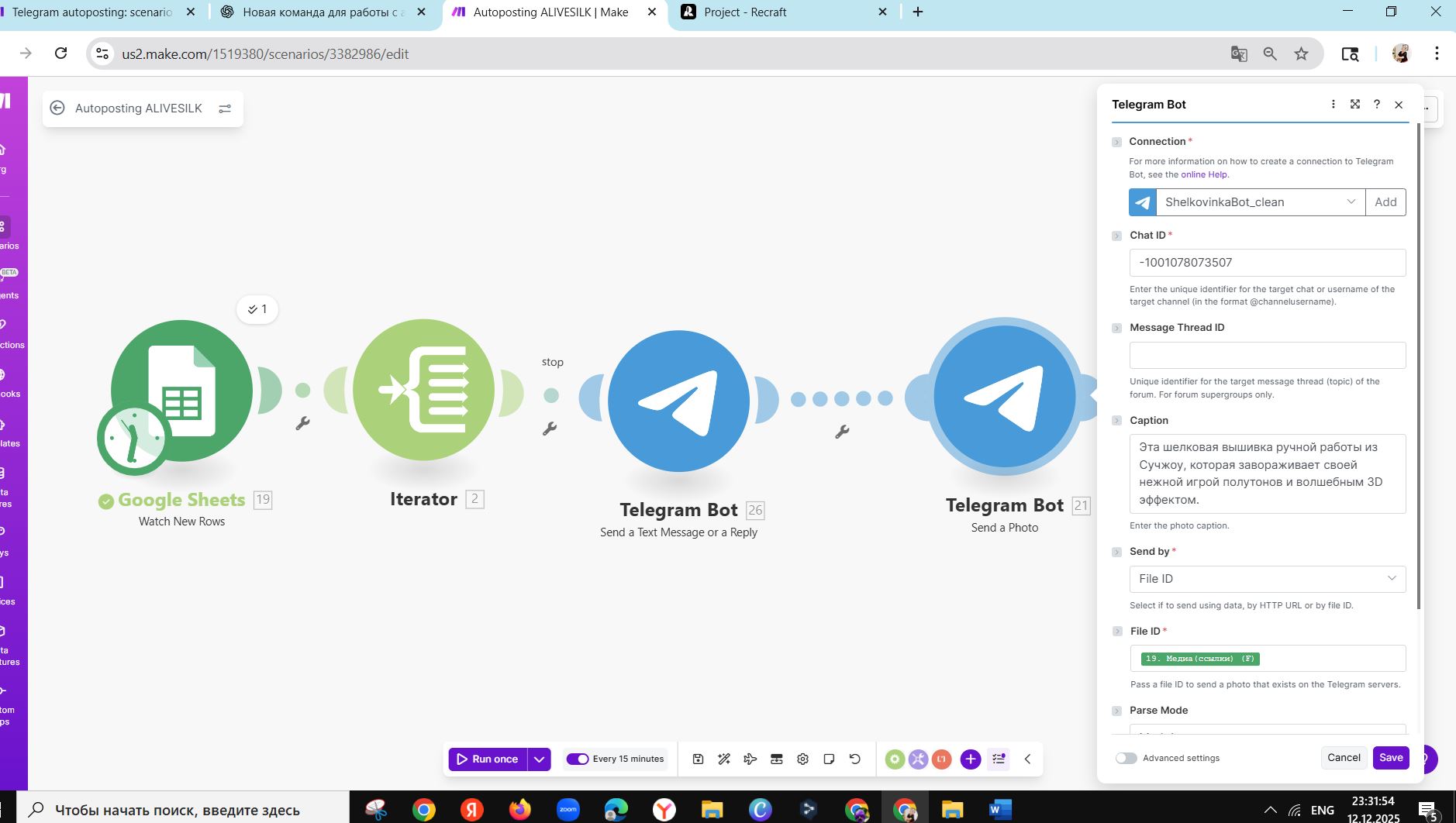
Clarification: we are NOT sending local files. We pass Telegram file_id values from Google Sheets into the Telegram modules (Send by = File ID).

Examples:
• tg_photo_file_id (from Sheets): AgACAgQAAxkBAAICZ2… (photo)
• tg_video_file_id (from Sheets): BAACAgIAAxkBAAICaG… (video/video_note)

Questions (yes/no):

  1. Must the file_id be obtained by the SAME bot connection (shelkovenkobot_clean), or any Telegram file_id works?
  2. For Video Note, should we map into “video_note” or “video”? Any constraints with File ID (duration/shape)?
  3. When module finishes with empty Output (no message_id), where in Execution Inspector can we see the raw Telegram API error?
  4. Any known cases when @usernameusernameusernameusername for channels (chat_id=@alivesilk) fails silently and numeric chat_id is required?

Screenshots already attached:

  1. TG Send a Video Note (channel), 2) TG Send a Photo (group), 3) Google Sheets/Iterator fields.

Clarification: we are NOT sending local files. We pass Telegram file_id values from Google Sheets into the Telegram modules (Send by = File ID).

Examples:
• tg_photo_file_id (from Sheets): AgACAgQAAxkBAAICZ2… (photo)
• tg_video_file_id (from Sheets): BAACAgIAAxkBAAICaG… (video/video_note)

Questions (yes/no):

  1. Must the file_id be obtained by the SAME bot connection (shelkovenkobot_clean), or any Telegram file_id works?
  2. For Video Note, should we map into “video_note” or “video”? Any constraints with File ID (duration/shape)?
  3. When a module finishes with empty Output (no message_id), where in Execution Inspector can we see the raw Telegram API response?
  4. Any known cases when @username for channels (chat_id=@alivesilk) fails silently and numeric chat_id is required?

Screenshots attached:

  1. TG Send a Video Note (channel), 2) TG Send a Photo (group), 3) Sheets/Iterator fields.

https://drive.google.com/drive/folders/1IP44N7anXmtkb2G4nvEnrAkeE1bLUkOA?usp=drive_link

The bot must have previously uploaded it. You cannot reuse file_ids from another user/bot.[1]

If there’s no module output bundles, you can probably only view the raw response using the MDT.

If you have the Make DevTool Chrome extension installed, you should be able to view the request and response headers and body from each module when you manually run the scenario.

From Make DevTool - Help Center :

Make DevTool allows you to debug your Make scenarios by adding an extra pane to the Chrome Developer Tools. Using this new debugger pane, you can check all the manual runs of your scenarios, review all the performed operations, and see the details of every API call performed. Additionally, with Make DevTools you can see which module, operation, or response caused an error in your scenario. This helps you debug your scenario and get your scenario back on track.

Why is this question asked? Are you encountering any issues using the username?

@samliew


  1. Source: How to retrieve the file_id of an uploaded file in Telegram bot? - #3 by Nate_91Surf - Telegram bot - Latenode Official Community ↩︎

Based on this screenshot, I deduce the following issue:

Polling Triggers & Empty “Check Runs”

If you don’t see any bundles from the trigger module and operations on the rest of the modules, it means there are no new items (empty output bundle) when the scenario ran to check for new items. This is called a “Check run”.

There are two main types of triggers, Polling (scheduled), and Instant (webhooks). Polling triggers can only run on a schedule. Instant triggers can be run as soon as data is received by the webhook.

  • Polling means Make checks external service for changes (pull changes to Make).
  • Webhook (instant) triggers means external service calls Make when there are new changes (push changes to Make).

The module you are using does not push changes — it’s basically a API request that Make has to occasionally “call” to fetch the latest changes/items.

To find out more on the different types of Trigger modules, see refer to Types of Modules and Webhooks sections of the Make Help Centre.

If you want your scenario to only run when there is new data (and not on a schedule or timed interval), see if your app has an “Instant” or “Webhook” trigger in Make. If not, check if the third-party service has a feature that can send out a webhook when content is created/updated - and then you can point it to a “Custom Webhook” trigger in your scenario.

If you want to re-run your scenario on older data,

Polling Triggers: Epoch Panel & Selecting Older Data

Go to the Epoch Panel, by right-clicking on the trigger module (polling triggers only), and select “Choose where to start” from the list of options in the context menu.

If you select “From now on”, the next time the scenario runs it will only return new data (or nothing if there is no new data).

You can also select other old data to re-run your scenario with next using the “Choose manually” option. This will then show you a list of previous historical items you can select to process the next time the scenario is triggered.

For more information, see

@samliew