Hello everyone, I am new here at the community and also a Make noobie, so cut me some slack. 
So, I have a scenario I’d like your help with, involving Google Calendar and Monday, where I get events from the first to create items on the last.
Note: I’ve tried to create a single Google Calendar listener to handle three different calendars, but it didn’t work, so I created the structure below.
BUT the thing is: the same event can be present on 2 or more calendars at the same time, which brings me to the issue: I don’t know how to handle that, and events are being duplicated, because the triggers are running with a second difference from one another, and they don’t stop on the condition I’ve created.
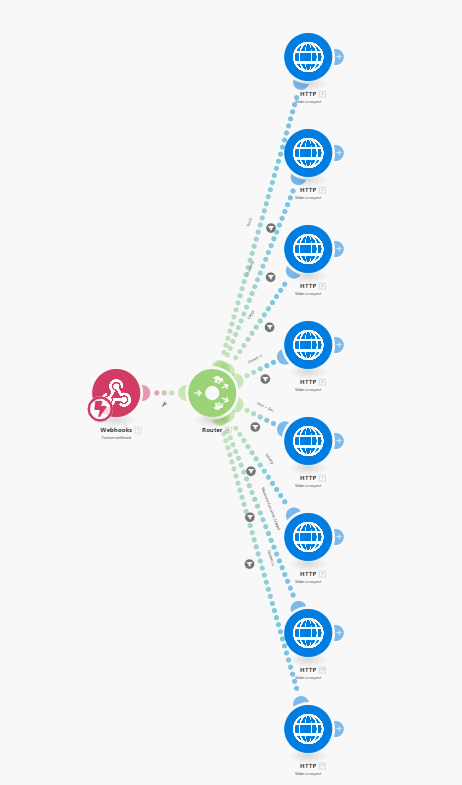
I also have a dispatcher in the structure, which leads to the scenario below:
Just after the webhook I used to have a Monday’s (Get an Item’s column Value) to check if the event already existed on Monday (using iCalUID) but decided to replaced it with 2 **Data Store apps (1 at the end, to store the record with the iCalUID key, and the other at the beginning, to Check the existence of a record).
**
From what I understood, making that change would be a better and faster approach (not mentioning it uses fewer credits  ) to my issue, but unfortunately, it was not.
So, hAlp.  Any ideas about what would help me in this scenario??
Thanks in advance.
Hey Melissa,
as I understand you have 3 identical scenarios right? And the problem is that an event can trigger multiple ones causing duplicates?
Instead you can have 3 small “watcher” scenarios - each one watching for new events and forwarding the webhook to a master scenario that handles the rest. Then on the master scenario enable sequential processing so only one execution can run at a time. This will guarantee that an event is processed and added to the data store before the next event starts being processed.
Hi Melissa,
Nice to meet you! We are Dalton AI, a company from Chile, and we’d be happy to help you with this case.
What you’re describing usually happens when the same event shows up in multiple attendees’ calendars. One possible solution could be to add a small “marker” (for example, in the description or a custom parameter) whenever an event is processed from Google Calendar.
That way, when the other accounts check their calendars, they will see that the event has already been handled and avoid creating duplicates in Monday.
If you’d like, we can walk you through the steps to set this up
You can send me a whatsapp at +56945224158
Best regards from Chile,
The Dalton Team
Hello, Stoyan!!
Thanks for your reply. 
I don’t know where to apply the solution you proposed, because all three listeners are calling the same webhook, and that webhook makes a series of HTTP requests to invoke different webhooks for each client-specific scenario, based on some filters. (image below)
But I realized that I was working with the same scheduling time for all 3 listeners. Now I’ve decided to change them, and I believe I can tackle the issue that way, right? I’m testing it right now. 
And based on the structure below, I wouldn’t know how to sequentially process the executions.  I’d have to add a new app before the Data Store, perhaps?
Thanks in advance.
Greetings from Brazil.
Click the gearbox on the toolbar at the bottom to open the scenario settings menu and its the setting on the top of the list.
Hi Dalton team, thanks for your reply too.
That’s exactly what’s been happening, and your solution seems to be more “elegant“ than that one I’ve created.  However, I’m still learning my way through Make and programming, and although I appreciate your offer, I believe we could enrich the community if we share solutions here.
Best regards!
Hi, Stoyan!!
Thank you again. I’ve set all scenarios as sequential.
Fingers crossed.