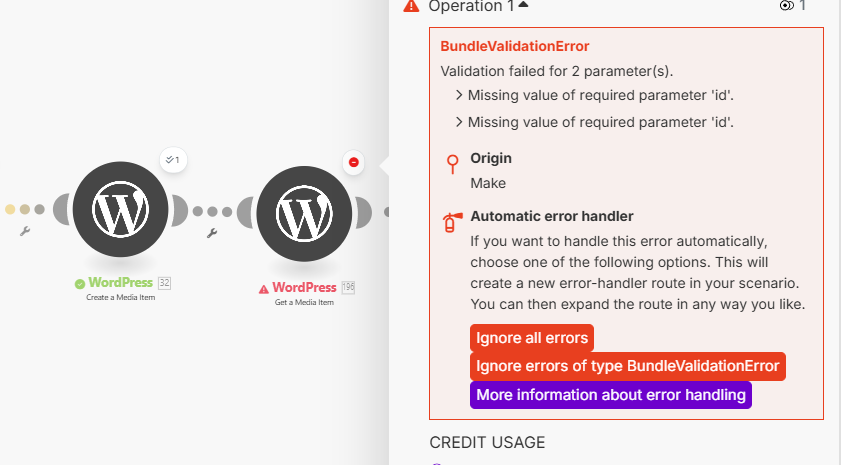
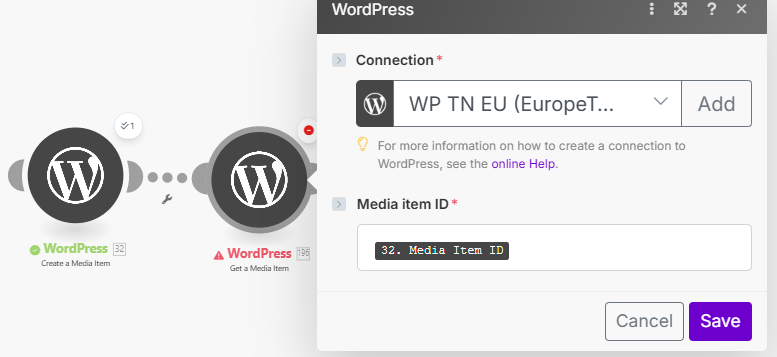
As the title says, for some reason this module doesn’t work, while another duplicated branch (same module but different connexion) works and the parameters are set up exactly the same way.
What am I missing ?
I suddenly have an issue in one scenario where the ‘WordPress get a media item’ module output the error missing value of required parameter ‘id’.
The odd thing is that the media item has been created and uploaded to the WordPress site during the previous step in this scenario and it also has an ID. However for some reason the module generates this error.
I’ve run this scenario many times without any issues and haven’t mande any changes. What could cause this error?
Same here! Anyone knows how to fix this or any workaround?
Same here!
Has anyone found a solution yet?
That’s exactly my issue, still haven’t found any solution.
Weird thing is, as per my screenshot, the first branch works fine for some reason, and mapping parameters are exactly the same.
Would be nice for a community manager to have a look at that and taking it to devs or smthn.
Hi everyone @here, thanks a lot for raising this in the community 
From what we can tell, it seems that the Media ID isn’t being returned in the API response for the “Create a Media Item” module.
As far as we know, there haven’t been any recent changes on our side that would affect this behavior, so it’s possible that something may have changed on the WordPress end.
It might help to create a fresh WordPress connection in the Create a media item module and see if that resolves the issue. Would you mind giving this a try and letting us know how it goes?
Thanks for the reply. On it ASAP and let y’all know
Hi everyone! Michaela is wright. If you remake a fresh Wordpress connection it solves the problem. Even with the same credentials from the make.com plugin.
Hope it helps.
Hi @Sergio_Jimenez_Mazur, thanks a lot for confirming that creating a new connection resolved this issue for you.
Not working for me, can anyone assist please?
”Create Media Item” module does create a media item in my wordpress website but returns nothing to the next module in the automation. Not a single parameter is being returned.
I tried create a new wordpress connection and also to rebuild the modules.
Hi @Haim_Shkolnik, I’m sorry to hear that you’re still experiencing the issue.
The best next step would be to open a support ticket with our Customer Care team. They have the right tools and permissions to look into your situation in detail and help you get it resolved.
Thanks a lot for your collaboration
Have you already updated the Make integration in Wordpress?
This is not the solution.
I’ve solved the issue, but it has nothing to do with creating new module.
Issue:
There has been wordpress-wide bug that had spread through all 5 of my wordpresses and it looks like it stems from make connector on wordpress .
The bug was that for some reason, the author & admin of the first wordpress branch and the make connector API had been duplicated through all wordpresses.
Which means that when reaching the second branch, it couldn’t find any media file because the API had been swapped with the first wordpress, and authors as well.
Solution:
I had to manually go through all wordpresses, create new admin account, delete the previous one, refresh the author, and very important, update the make connector extension, generate new API, and refresh the connexion in make.com - for each branch.
This has completely solved the issue.
Potential Origin of issue:
It looks like the issue comes from the make connector wordpress extension because the API & admin was duplicated through all wordpresses, therefore creating bugs when trying to get media & publish.
Same here, updating the Make plugin and regenerating a new API-key solved the issue for me as well.