Work with Archives

Hello,

I want to process a zip file and have been stuck for several weeks. I hope someone can help me. I am a complete novice when it comes to automation.
I have a zip file containing many PDFs with the first and last names as file names. The zip file also contains a json file. It contains the names and corresponding email addresses. How can I read the json and send the PDFs to the email addresses listed in the JSON?

Translated with DeepL.com (free version)

Use the HTTP get a file module to get your file.

My problem is not getting the file; I already obtained it in advance using “http - make a request.” I am unable to separate the JSON from the other PDFs in it and then send the individual PDFs to the emails listed in the JSON.

Can you share some screenshots of what the data looks like so we can help parse it?

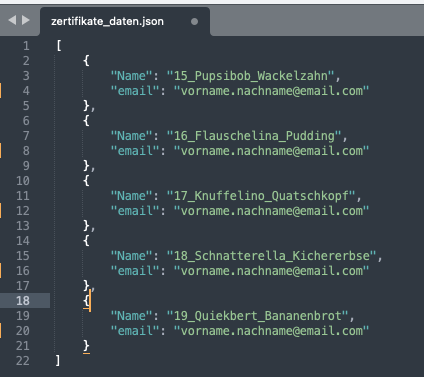
This is what the data looks like.

  1. The folder with the data that is in the zip file.
  2. Contents of the JSON file.

As I said, I would like to send everyone their PDF certificate by email.

Thank you very much for your help.

Hi @Arthur4

My initial approach would be:

  1. Download the file with the HTTP app (looks like you already did it)
  2. Unzip it with the Archive app.
  3. Upload the resulting files to some cloud storage, eg a temporary Google Drive folder.
  4. Download the json file.
  5. Parse the JSON string
  6. Add an Iterator. For each Collection found, download the corresponding PDF file and send it via email.
  7. You can even add checks with a spreadsheet, a database or a Make Data Store, not to send the same file more than once.

Once it’s working as expected, check if it’s possible to optimize any steps.

@damato

Thank you for the tip, I will definitely try this approach in the next few days.

Is there a way to avoid integrating another tool (Google Drive) in this scenario? I am from Germany, and here companies are very cautious about processing customer data via cloud services due to the GDPR.

Hi @Arthur4

Since you have this restriction, I suggest you take the following approach:

  1. Download the file with the HTTP app (looks like you already did it)

  2. Unzip it with the Archive app.

  3. Add a Filter to allow only the JSON file to move to the next module

  4. Parse the JSON file Data.

  5. Unzip the original file again with the Archive app.

  6. Add another filter, this time only allowing PDF files.

  7. Add an Iterator. For each file found, check the JSON and send it via email to the corresponding address.

  8. You can even add checks with a Make Data Store, to avoid sending the same file more than once.

@damato

1 Like