Hi all, I am new to make and need your help in an issue I am facing. I want to check any new emails coming to my gmail account and add the email address to my brevo account if doesn’t exist there already. I have created the attached scenario but it always executes the error module ignore and doesn’t go to to the router module so a new email address doesn’t get added to brevo.
If I don’t add the error handler then the scenario gives me ‘Document not found error’.
Can someone please help me with this?
Thank you for your reply. Based on your reply, I changed the scenario as below but now it gives me ‘Document not found’ error on the Get a Contact module. I think I am nearly there but need to make a tweak which I am being unable to figure out.
I managed to make the scenario work by adding a resume at the get a contact module. The emails are being added to brevo. See below the final scenario. Let me know please anything I need to change. Thank you for your help again!
Or you could just move the “Create a Contact” module to just before your Resume module, as shown in my screenshot above. This way, you do not need another router module.
If I may ask one more thing. I also want to add the First Name and Last Name to the Brevo contact but the output from Get an Email module only gives ‘From (name)’ which contains the full name. So how can I separate first name and last name from there?
3. Have a different/follow-up question? Start a new topic.
Creating a new topic for each question makes it easier for others with the same problem to search for answers. You are also more likely to receive help sooner as new topics are displayed first on the forum’s “new” page!
 What is your goal?
 What is the problem & what have you tried?
 Screenshots (scenario flow, module settings, errors)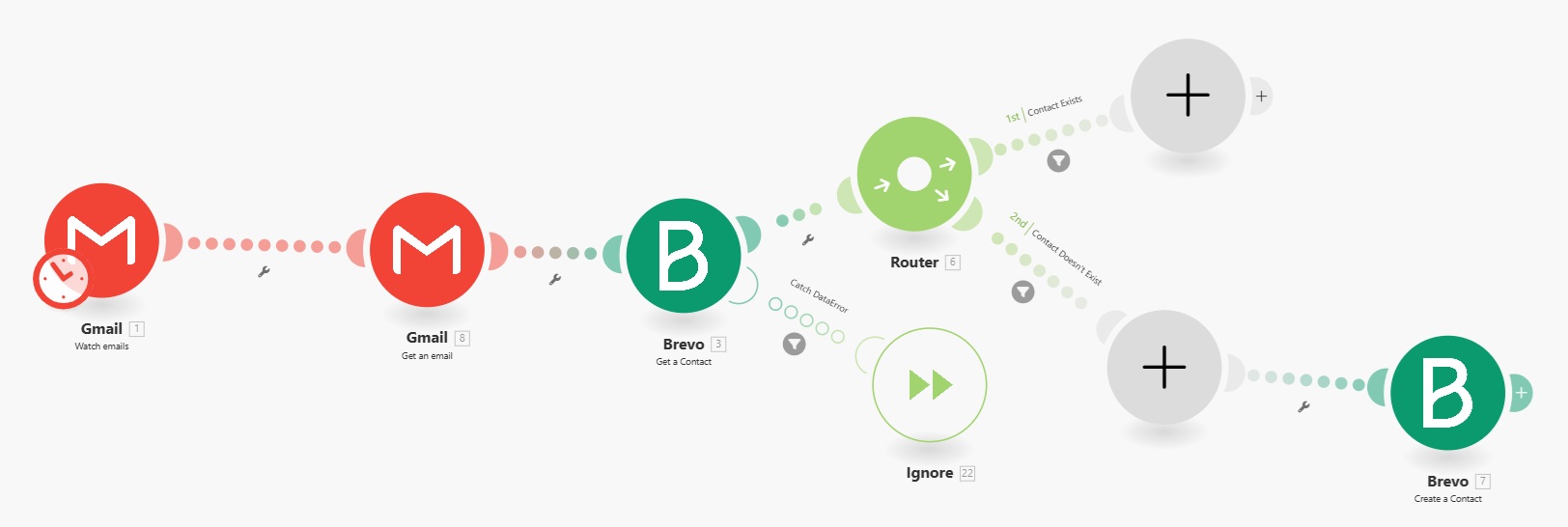



 Here’s a magic link to a list of your other “unsolved” topics: