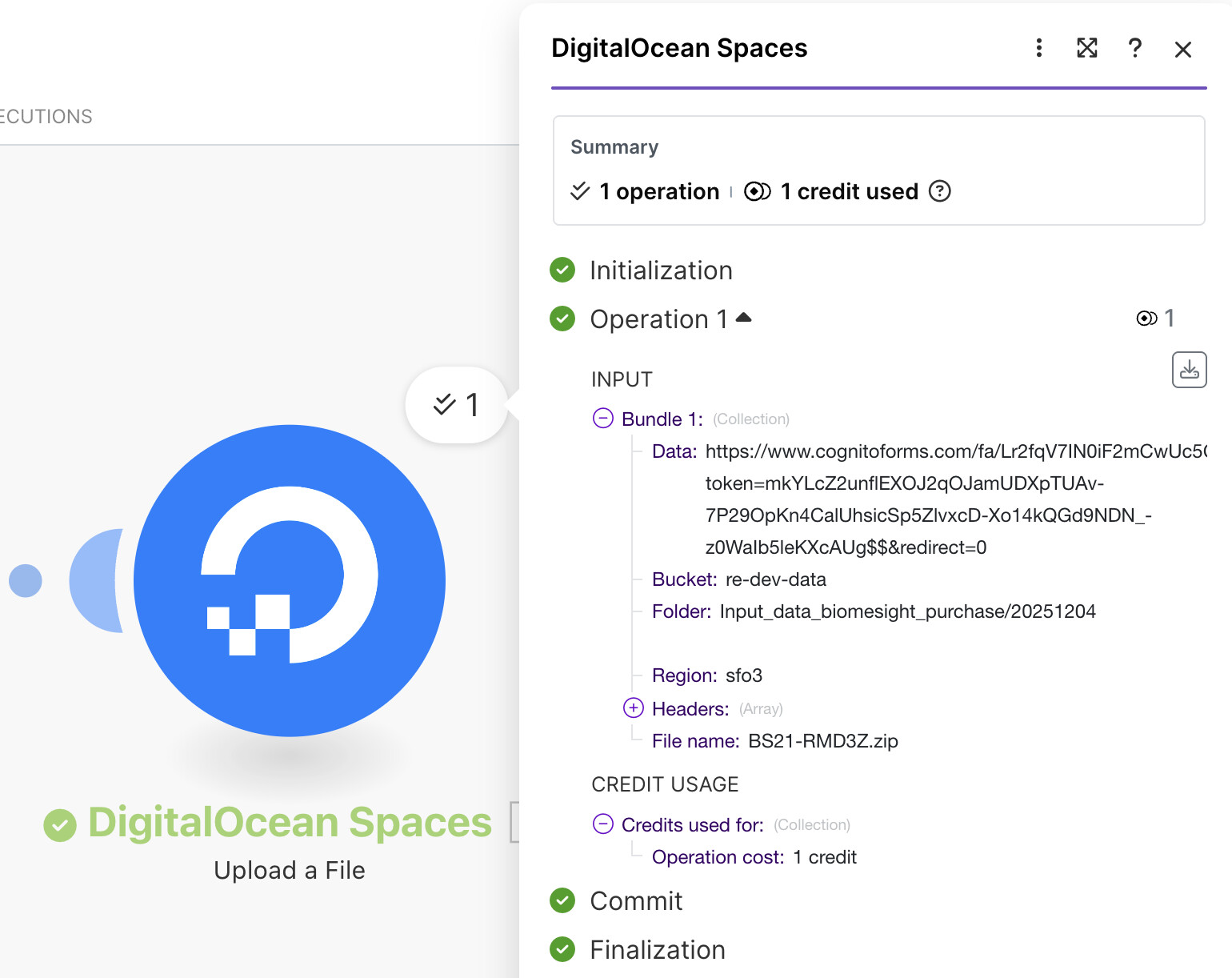
A file is uploaded to a Cognito Form, which send a webhook to make.com.
I want make.com to upload this file to a S3 bucket hosted on Digital.Ocean Spaces
What is the problem?
It uploads a link to the file not the actual .zip file itself!!
The link shown in the first image below is live, and it links to the file!
But as you can see, a much smaller file that’s just a text file is uploaded instead. It just has the URL inside…
What have you tried so far?
Well, I started with the DO Spaces file connector. I have not tried other S3 connectors, but I could I guess.
It’s possible the issue is with the incoming data from Cognito Forms.
@re2 So you need to implement an HTTP Module (Get a file) that downloads the file from Cognito’s URL, then map that binary output into the DigitalOcean Spaces upload module.
Did you forget to download the file using the file’s link/URL? If it’s not downloaded to the scenario, the next module can’t access the file binary data (contents).
To do this, you can use the HTTP “Get a File” module with the file URL that you need to download. Your file has to be publicly accessible on the internet (doesn’t require authentication).
Fixed! Just like you suggested, I first have to download the file in the scenario and then the DigitalOcean Spaces connector could see it and upload it.
 What is your goal?
 What is the problem?
 What have you tried so far?
 Screenshots: scenario setup, module configuration, errors