Hi,
I have a scenario which is watching for Jotform submissions. One of the questions asks for a child’s name. What I want the scenario to do is:
a) If there has already been a submission including this child’s name I want it to send an email to a specific group.
b) If there has not been a submission including this child’s name I want it to add a new row to an excel file.
I can’t figure out how to filter the results to look for this child’s name in previous submissions. Does anyone know of any way to do this?
Any help would be appreciated!
Hey Rachel,
you will need to list all submissions and check them, or since you are populating an excel file - check if the name already exists there?
Hi Stoyan,
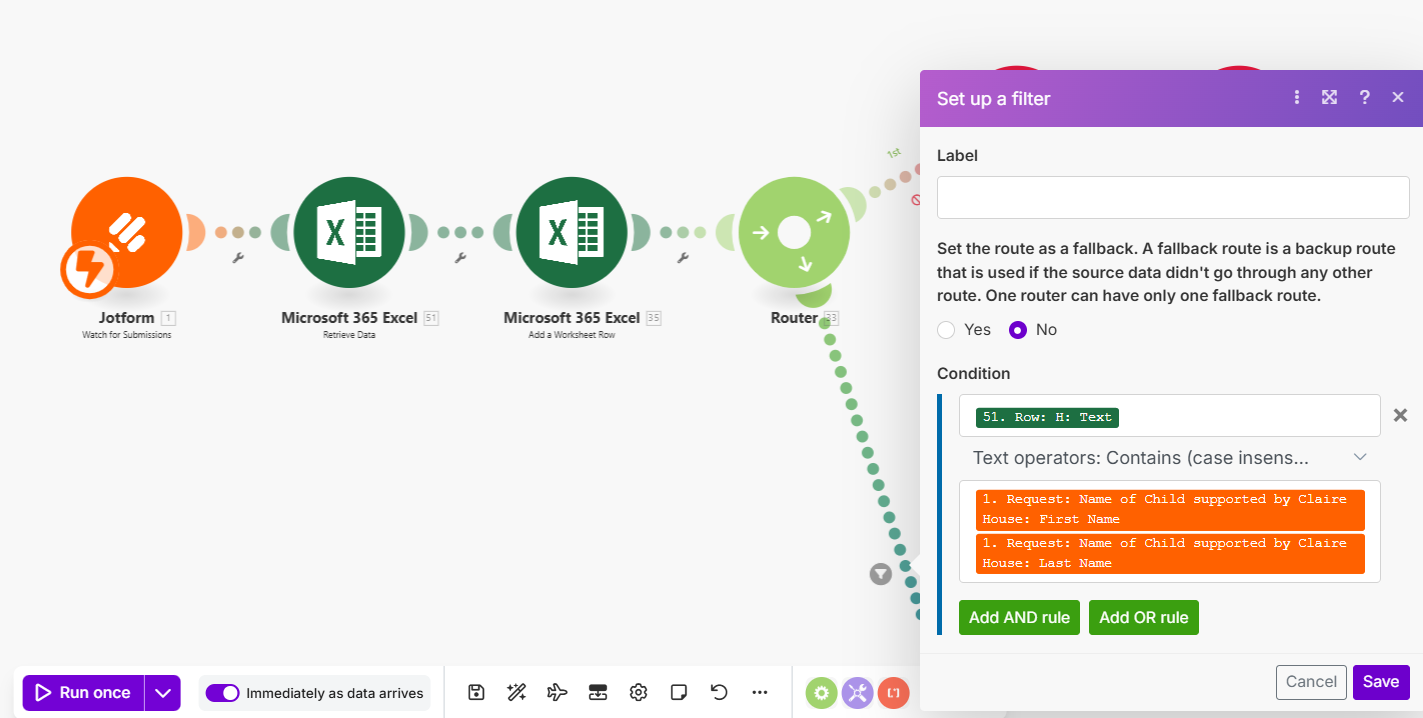
Thanks so much for your reply! I have been playing about with looking for the name in the excel file and it’s very close to working but I am coming across a couple of issues. First of all here’s what my scenario looks like at the moment:
When the Retrieve Data module runs it is looking in column H where the child’s name is stored. It pulls out 9 bundles as there are currently 9 rows in the spreadsheet
When the scenario moves onto the next module - Add a Worksheet Row - instead of adding one row with the information from the initial Jotform response it adds the same information 9 times:
The filter I have set up so that the scenario goes down the Send an Email path is below and does appear to pick up where the name exists already (twice in this scenario) but again, the module then sends 2 emails rather than one.
I think what I am struggling with is how to make sure my scenario only executes these actions once and avoids the different bundles. Do you have any idea what I might be doing wrong?
Hello @Rachel_Adam and Welcome to the Make Community!
Retrieve Data is returning multiple bundles (one for each row found), so in this regard it’s acting like an Iterator and wants to run everything after that once for EACH bundle.
To stop this, you can add an Array Aggregator after Retrieve Data then use Retrieve Data as the source for the Aggregator. Then the Array Aggregator will output a single array containing all the rows. The rest of the rows will have access to that array rather than each individual row, so you’ll need to use array-related functions to access the row data - like map() or get() etc…
Do you intend to search each row for the name you’re looking for before adding a new row to the worksheet?
Hi Donald,
Thank you for the info! Yes, the idea is that it would look at every row in column H to find a matching name. We now want a row to be added whether a match is found or not and if there is a duplicate for an email to be sent.
I can look at adding an Array Aggregator after Retrieve but I’ve not actually used these in any of my scenarios so if you had any specifics of what to add after this that would be really useful.
Thanks for your help, really appreciate it!
You’d just put the Array aggregator in there immediately following retrieve data.
Following that with the Add a Worksheet Row should be fine since you want to add a new row anyway.
The last piece is searching the array of rows for the value you added and sending an email if found.
I’m afraid I can’t get into too much more detail right now, but you should be able to use the map() function combined with some filters on the route going to send the email.
Thanks Donald, that’s been super helpful!
Your ideas along with the discussion on this topic meant I was able to get it to work Recognize duplicates excel - #3 by Florian
Thanks!