Google Workspace Admin module configuration

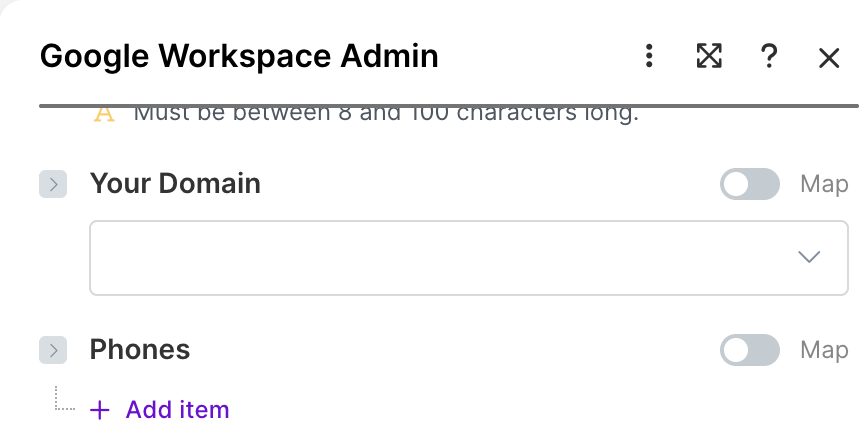
Hello, I’m using the Google Workspace module which automatically appends a domain value to some of the module fields; in my case it’s the “Manager’s Email Name” field.

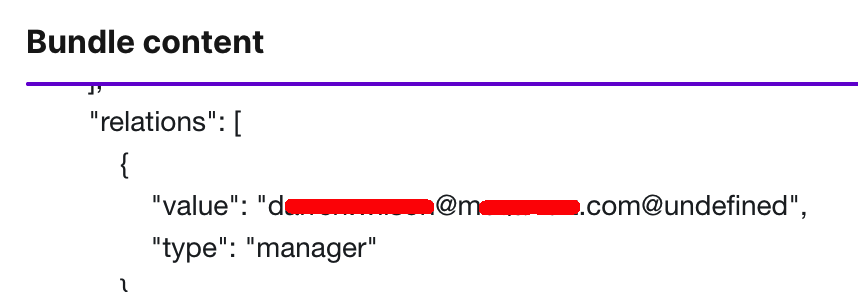
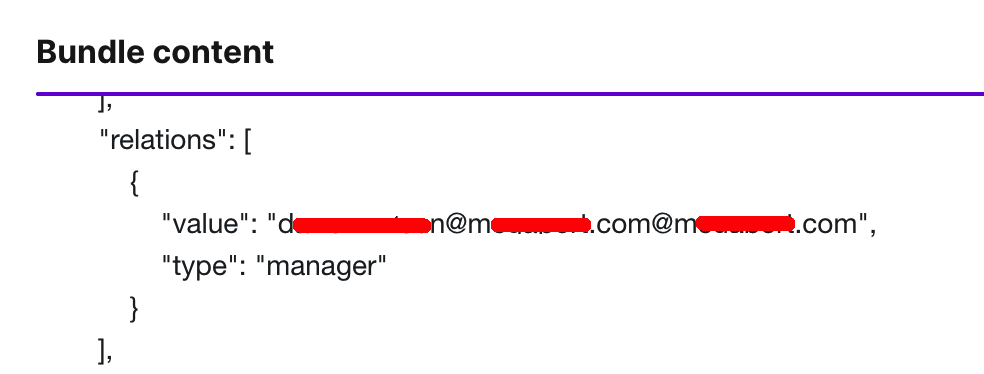
The array value i’m inputing already contains the domain in the value, but I can’t find a way to disable this auto-append domain value. This creates an issue with the output value having two domain values, even if i don’t assign a domain value in the “Your Domain” field:

If I assign the domain, it appends.

Is it possible to disable the auto-append “your domain” value function in the module?

Or how could I remove/replace the additional domain value from an array value? (The Replace function isn’t able to be used).

Thanks for any assistance.

Andrew

Welcome to the Make community!

You’ll need to split the email into the username and domain.

To do this, you can use these built-in functions:

Here’s an example of how you can use these functions together:

User {{ first(split(1.email; "@")) }}
Domain {{ last(split(1.email; "@")) }}

Hope this helps! If you are still having trouble, please provide more details.

@samliew
P.S.: investing some effort into the tutorials in the Make Academy will save you lots of time and frustration using Make!

1 Like

Thanks for the assistance @samliew!

I’m not entirely sure I understand the solution. The array that I’m getting the element/value from contains a single value. My current understanding is that the “First” and “Last” functions would only work if there were multiple values in the array, and the “Split” function would only work where the multiple values in the array had a common delimiter e.g. a comma.

I’ve configured a multi variable module to show the output that I see when using the suggested functions. I’ve configured Length, First and Last functions to help explain the process to me and then one of your provided solutions as well. This is the config:

This is the input/output details I’m getting:

What am I missing?

Really appreciate the assistance.

Andrew

Your variables doesn’t seem to be set up correctly, because I can do the same.

You can reproduce the above using the demo export below.

Module Export - quick import into your scenario

You can copy and paste this module export into your scenario. This will import the modules (with fields/settings/filters) shown in my screenshots above.

  1. Move your mouse over the line of code below. Copy the JSON by clicking the copy button on the right of the code, which looks like this:

  2. Enter your scenario editor. Press ESC to close any dialogs. Press CTRLV (paste keyboard shortcut for Windows) to paste directly in the editor.

  3. Click on each imported module and re-save it for validation. There may be some errors prompting you to remap some variables and connections.

JSON module export — paste this directly in your scenario

{"subflows":[{"flow":[{"id":243,"module":"json:ParseJSON","version":1,"parameters":{"type":""},"mapper":{"json":"{\n  \"array\": [{\n  \"wd:workerManagers_group\": [\n    {\n      \"wd:primaryWorkEmail\": \"user@example.com\"\n    }\n  ]\n  }]\n}"},"metadata":{"designer":{"x":3360,"y":-2628},"parameters":[{"name":"type","type":"udt","label":"Data structure"}]}},{"id":242,"module":"builtin:BasicFeeder","version":1,"parameters":{},"mapper":{"array":"{{243.array}}"},"metadata":{"designer":{"x":3609,"y":-2624}}},{"id":244,"module":"util:SetVariables","version":1,"parameters":{},"mapper":{"variables":[{"name":"step1-split","value":"{{split(242.`wd:workerManagers_group`[].`wd:primaryWorkEmail`; \"@\")}}"},{"name":"step2-first","value":"{{first(split(242.`wd:workerManagers_group`[].`wd:primaryWorkEmail`; \"@\"))}}"},{"name":"step3-last","value":"{{last(split(242.`wd:workerManagers_group`[].`wd:primaryWorkEmail`; \"@\"))}}"}],"scope":"roundtrip"},"metadata":{"designer":{"x":3850,"y":-2625}}}]}],"metadata":{"version":1}}

Note: Did you know you can reduce the size of blueprints and module export code like the above, using the Make Blueprint Scrubber?

Hope this helps! If you are still having trouble, please provide more details.

@samliew

Hi @samliew , many thanks for the assistance and the demo. The problem was indeed related to my variable value; correct value is below:

Thanks!

No problem, glad I could help with "Google Workspace Admin module configuration"! :slight_smile:

1. Which was the most helpful post in this thread?

The Make Community guidelines encourages users to try to mark helpful replies as solutions to help keep this forum organised. :folded_hands:

This marks the topic as solved, so that others can:

  • save time when browsing the latest activity on the forum, and
  • quickly jump to the solution in this topic

To do this, simply click the checkbox at the bottom of the post that is the most helpful in answering your question.

a screenshot of post menu options at the bottom of each post

:link: Here’s a magic link to a list of your other “unsolved” topics: status:unsolved

2. Have you learnt something new?

Do bookmark this topic so you can easily find and return to this topic in future.

a screenshot of bookmark link at the bottom of the topic

:link: Here’s a magic link to a list of your bookmarks /my/activity/bookmarks

3. Have a different/follow-up question? Start a new topic.

Creating a new topic for each question makes it easier for others with the same problem to search for answers. You are also more likely to receive help sooner as new topics are displayed first on the forum’s “new” page!

I’d recommend going through the Make Academy if you haven’t yet!

Here are some useful links and guides you can use to learn more on how to use the Make platform, apps, and app modules. I found these useful when I was learning Make, and hope they might benefit you too —

Learn Make

How-Tos

Useful to Know

My Custom AppAbsolutely Free!

Save headaches and operation credits with these utility modules:

  • Chunk Text
  • Chunk Array
  • Chunk Words
  • Multiple Find & Replace
  • Collection to Array/String List
  • Execute JavaScript
  • Estimate Tokens
  • Calculate Difference Between Two Dates
  • Get Next Business Day (with holidays)
  • List Upcoming Dates of Day of Week
    and more!

@samliew