I want to create something on my website where Users open up a little bubble or chat, answer a few multiple-choice or short-answer questions, and then AI generates a completed digital product inside a template on google docs and google sheets that I have created. So it would go: What do you want to make? It would then provide a list of digital products. the user would choose which one. then it would ask the user to choose a colour style. they would click which one they want. then the user would be asked “Who are you and what do you do?” and the user would type for example: I’m a coach who helps people grow their online prescence.” and then the AI would fill in the template that i’ve created on google docs or google sheets. Kind of like if you were to ask chatgpt to write an entire ebook for you. Except, my bot would put it all into a premade template for the user. HOW can I make this happen?
Hello, welcome to the community.
-
Chat bubble - Make.com does not have any native embedded chat that can be used. You must rely on 3rd-party software if you really want to have chat bubble on your website.
-
For this type of configurator, you should go IMO with some kind of form solution - like Fillout or Tally. It will ensure user replies are structured and it will be much easier to work on.
-
The community is a place where we try to help solve users’ problems- no one will create a workflow from scratch for you. If you encounter any errors- please share screenshots or a problem description with us.
Hello, I never asked nor expect anyone to create a workflow from scratch for me. I’m completely new to this so am asking for help so I know how to use the software. The academy has only done so much in way of learning what I need to learn and answering questions that I have. Someone had suggested voice flow and make but I don’t know how to connect the two, how the work would flow and what subscription tier I’d need for make. I will move on to another software since help for absolute beginners is not available here in the community at make. Thanks.
There are dozens of variables in these types of projects - you only have an idea.
We do not know what products will be available and how many of them, how long inputs should be, or how many options to choose from.
Do these options need to be updated dynamically or are they completely static?
Can user input contain images?
Should this system handle empty responses?
Where will it be located and how are you supposed to handle data privacy (GDPR or other similar laws)?
I’m really sorry I haven’t met your expectations.
Don’t get discouraged - we are here to help with Make.com. You need help with the whole project at this stage.
Yes - Voiceflow is one of the many options. There are also Chatbase, Botpress and several other new tools published DAILY to choose from 
But that’s only the tip of the iceberg. To effectively create this type of project, you need to understand the basics of LLMs, JSON, HTTP and API calls to handle unexpected results from user inputs. If you’re new and have knowledge from YouTube or courses - this project may look simple to you. In reality - to make it reliable and deliver good quality output in 99% of requests, you will spend dozens of hours.
And you are more than welcome to share your problems with scenarios or particular modules once you will have anything to share detailed with us.
Welcome to the Make community!
I would suggest completing the Make Academy before jumping into building a complete scenario. If you need specific assistance when you are building a scenario it’s easier to help you then.
Here are some useful links and guides you can use to learn more on how to use the Make platform, apps, and app modules. I found these useful when I was learning Make, and hope they might benefit you too —
Learn Make
- Help Centre | Tutorials – Make’s “manual” - search for help here first
- Make Academy – Basics 101: Learn Make properly to get your money’s worth
- Mapping – What is mapping? What can I map?
- Mapping with arrays – How to map items in an array
- Date Format: tokens for
parseDate| tokens forformatDate - HTTP modules – Make a request, Get (download) a file
- Webhooks – Error Handling, Responding to webhooks
How-Tos
- Router Magic Formula - YouTube
- Error Handlers in Make - YouTube playlist
- Aggregate an array for mapping complex fields
- Getting started with OpenAI - How to setup and use OpenAI in Make
- Text Parser module - Use pattern matching to extract the text you want
- Webhooks – Make Academy - tutorial on how to use Webhooks
Useful to Know
 How to schedule scenario for first Monday next month (recurring)
- How to schedule scenario for the last day next month (recurring)
- How to Extract URL Query Parameters Into Variables
- Overview of Different Web Scraping Techniques in Make

- [Free] Use Groq AI to filter spam emails and form submissions!
 Automate Follow-Up of Email Leads a Week After
- How to group bundles in X amount of bundles (Chunking Arrays)
My Custom App — Absolutely Free!
Save headaches and operation credits with these utility modules:
- Chunk Text
- Chunk Array
- Chunk Words
- Multiple Find & Replace
- Collection to Array/String List
- Execute JavaScript
- Estimate Tokens
- Calculate Difference Between Two Dates
- Get Next Business Day (with holidays)
- List Upcoming Dates of Day of Week
… and more!
Urgent / Private Support
You can use the Hire a Pro category to request for private 1-to-1 assistance via video call/screenshare/private messaging/etc. This may help you get your issue resolved faster especially if it is urgent or contain sensitive information. It is important to post your request in the Hire a Pro category, as forum members are not allowed to advertise their services in other categories like here (even if it’s free/unpaid). Posting in the Hire a Pro category will allow other members to assist you over other forms of communication.
How to Message Another User
You can use the private messaging feature to directly reach out to other forum members. To do this, go to your inbox, and click on the “New Message” button on the right.

Alternatively, you can also click on clicking on their username/avatar, then click on the “Message” button in the popup card.
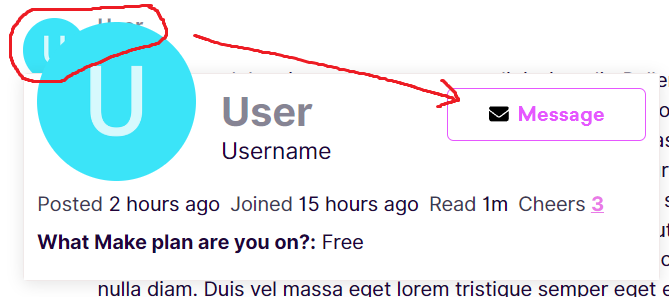
Hope this helps! If you are still having trouble, please provide more details.
— @samliew