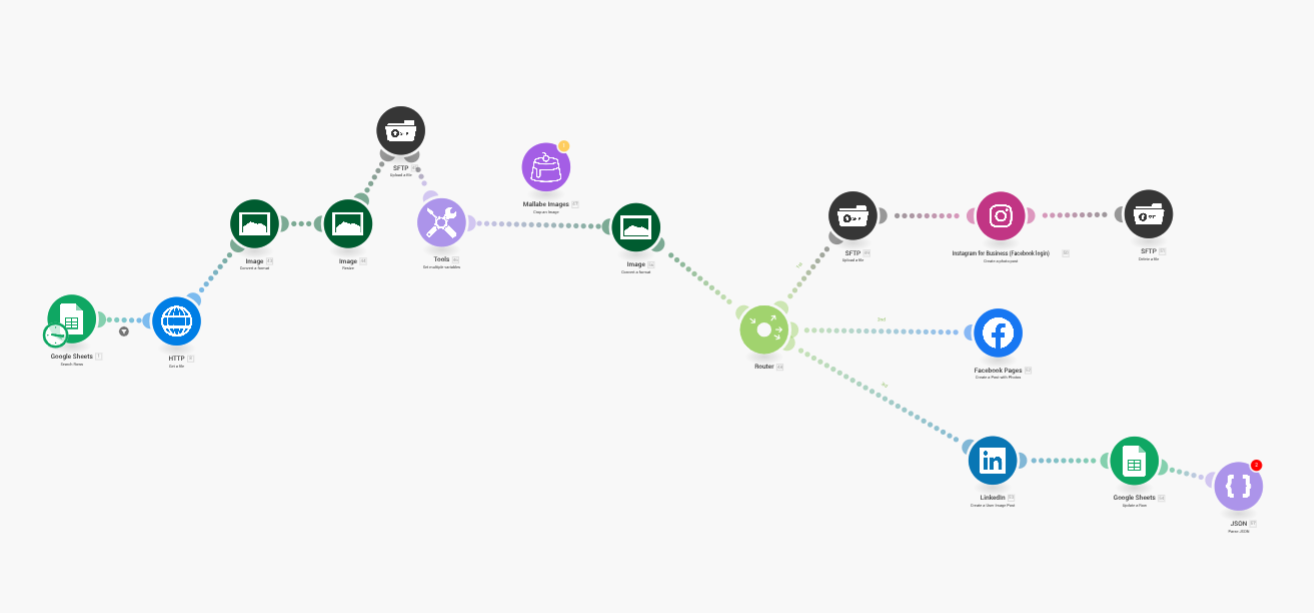
I have a scenario that gets an image on a server then post it on insta and linkedin. This scenario is schedule to run once a week.
How to properly stop it without errors at the end of it ? Previously I had a JsonParse module, it was stopping the scenario but also was creating an error. With this Json module error, my scheduling of once a week is deactivated by Make after a few runs, so I have to come to the dashboard and reactivate the schedule every 2 or 3 weeks.
Now if I remove this module, the scenario keeps running in loop.
If you don’t need Json module for further using the data coming out of JSON module, I think you are fine till google sheets module. Delete json module and save your scenario.
To avoid scenario running in loop we need to see the trigger. so, for further help share your full scenario so we can guide better.
I guess you can just add 1 more column with Status header or title and have 2 status minimum. Like To be Processed or Pending, which you will search in trigger step. And at last step of updating google sheet row, you can add a status column update value as Processed or Done. So non of the rows with rows will run in loop as status what you search in trigger will be updated for the processed row.
Start at “Ready” Status in your sheet, Add limit in trigger module to just get 1 record only and end the scenario with update a row module with same row number from trigger module of search rows and updating with “Posted”. So even if there are more than 1 records with “Ready” Status, it will only list 1 row at a time of execution.