I’m chunking text into multiple parts.
I want to ad part 1 in google sheet in column a, part 2 in column b..etc same row
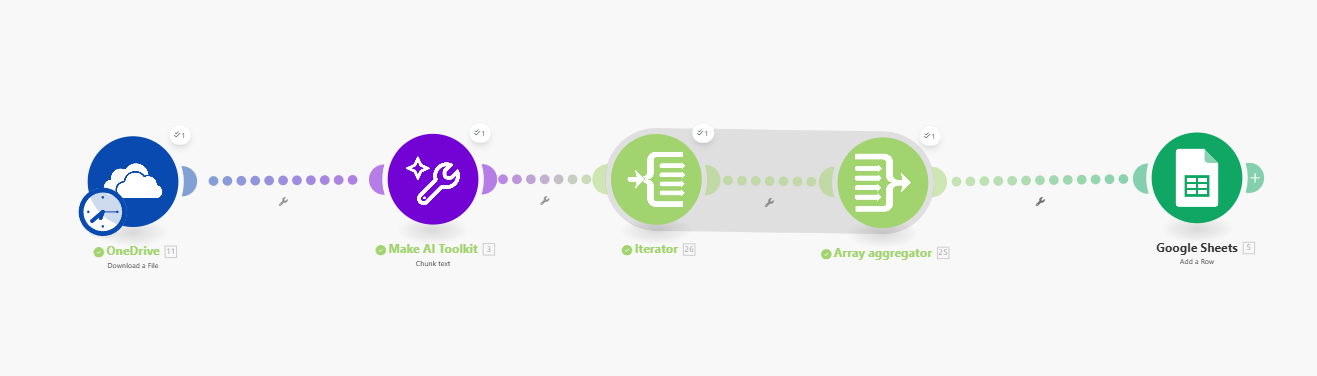
My Issue:
I can only see the first element of the array.

I need to be able to pick and choose [1], [2], [3], [4]..etc
Hello @xtina.fan , that’s how it displays. Doesn’t mean that there’s just one item in the array. When you map the array into an input Field, it outputs the entire array and to be sure, you can also download the output and input bundles
Yes I understand, but I don’t want to add the aggregated arrays into one cell, i need each cell to have a chunk
1st chunk column A
2nd chunk column B
3rd chunk column C
4th chunk column D
all same row
Well, a cheap and inelegant way to do it is something like:
ifempty(Chunk[1);””)
for each column. So chunk 1, chunk 2, etc. with the maximum number of chunks you expect.
It’s inelegant because if you get more than what you planned for.…
L
this is so smart, i may use it in the future but like you said I don’t know how many parts I will have
samliew could you help please?
If you have aggregated the items into one array you can
1 count how many items in array
2 use the indexed accessor [] to access the element by using an iterator to loop and add the index number in a loop using a variable and then use that in the iterator.
If you want someone to write this for you let us know. I’m sure there is someone who will take the time to work this out.
If you have an array of collections, in programming terms, this is called an array of objects, or an array with non-primitive data types (“complex”).
The Array Aggregator module is very powerful because it allows you to build a new complex array of collections that matches a later module’s field to map multiple items (collections) to it. Such fields initially would allow you to manually add items, but you can toggle the “Map” switch to the “on” state and map a whole array into a single field.
This is done by selecting the “Target structure type” in an Array Aggregator module.
As you can see from the above example, the “Map” toggle on complex fields are used when you have an array variable (like from an array aggregator). Other combinations of modules may also allow you to generate an array that matches a future field’s array structure, like “Aggregate to JSON + Parse JSON”, or “Create JSON + Parse JSON”, but this is an advanced topic.
Question: Are you mapping your array into a field that accepts more than one item/collection?
Here is an example of how your scenario could look like:

This is just an example. Your final solution may or may not look like this depending on your requirements and actual data.
For more information, see “Mapping with arrays” in the Help Centre. You should also do the Make Academy, which also covers the use of Iterators & Aggregators.
Hope this helps! Let me know if there are any further questions or issues.
— @samliew
