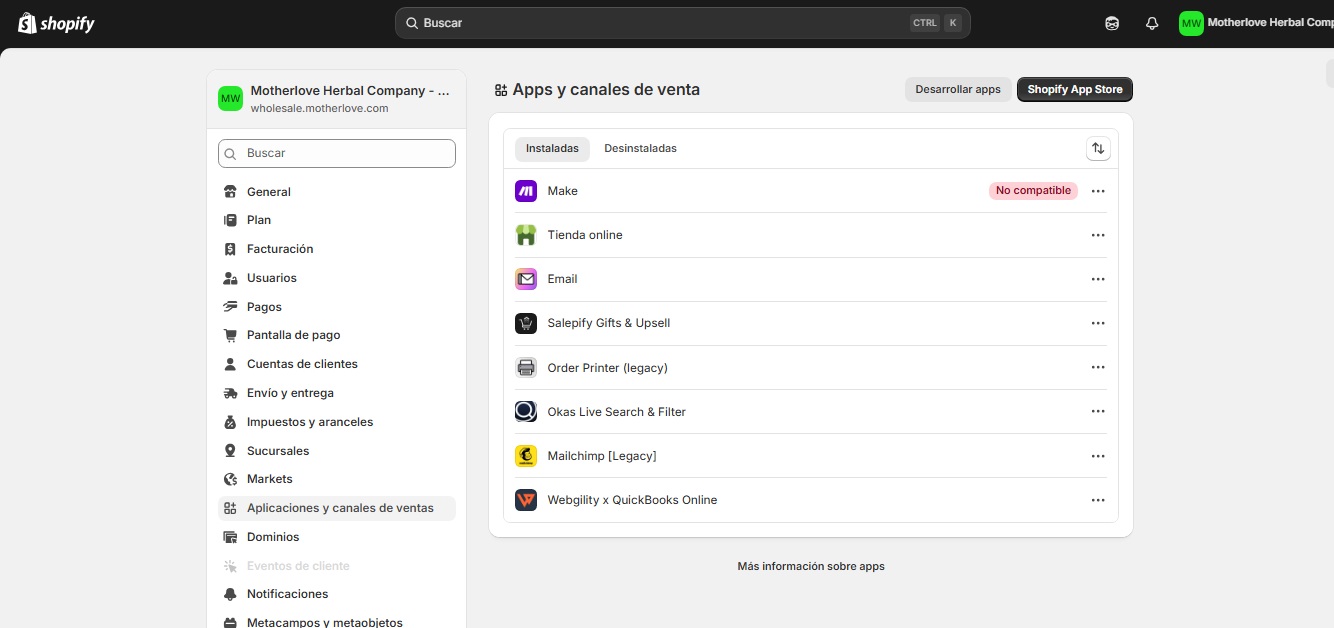
Hello everyone,
 What is your goal?
Use the app on Shopify, and leave my flow as it was configured.
 What is the problem & what have you tried?
I have the Make app (formerly Integromat) installed on my Shopify store, but I’m experiencing a serious and persistent problem when trying to access it:
Compatibility Status: In my Shopify admin, the Make app is marked as “Not Compatible” (unsupported).
Error on Opening: When I click on the app from the “Apps & Sales Channels” section of Shopify, the window or tab opens with a “Broken Link” (usually a 404 error or a browser error message). I can’t access the Make settings interface.
Broken URL: The URL it tries to load is in the format https://admin.shopify.com/store/[my-store]/apps/[app-ID], which is the expected path, but it fails to load.
Key Questions:
What might be causing the “Not Compatible” status on a recent installation? (For example: Shopify plan restrictions, outdated API version, or specific store requirements.)
Are there any prerequisites (such as user permissions or store features) that I should verify for Make to function correctly?
Should I try uninstalling and reinstalling the app, or might this worsen the problem?
Any guidance or troubleshooting steps that have worked in this scenario would be greatly appreciated.
1-
{“name”:“Error”,“message”:“GraphQL query returned errors”,“stack”:“Error: GraphQL query returned errors\n at NewGraphqlClient. (/data/integromat/imt-hq/node_modules/@shopify/shopify-api/lib/clients/graphql/graphql_client.js:47:23)\n at Generator.next ()\n at fulfilled (/data/integromat/imt-hq/node_modules/tslib/tslib.js:167:62)\n at process.processTicksAndRejections (node:internal/process/task_queues:95:5)”}
2- “Not Compatible” (unsupported).
 Screenshots (scenario flow, module settings, errors)