I’m repurposing my tiktok contets on facebook, instagram and youtube. on this platform i’m havinga lot of troubles and wasting my credits.
What is the problem?
The automation process succedes, it upload a file, BUT the youtube platform says: processing abandoned.
What have you tried so far?
module 1 MAKE request form tiktok api to get video information.
module 2 route the file to facebook and instagram, worked like a charm.
when i route to YOUTUBE it works but the upload does not succeded.
i tried to use http GET A FILE module before youtube but IT DIDNT WORK.
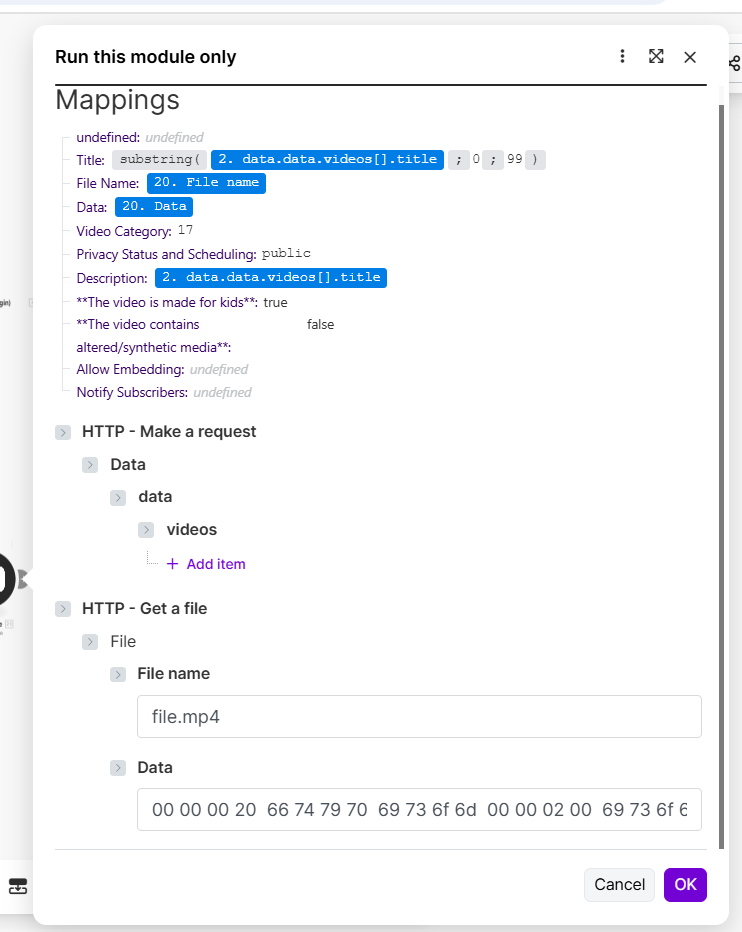
You have incorrectly mapped the file data in the YouTube module. Please provide screenshots of it.
To allow others to assist you with your scenario, please provide the following:
1. All Relevant Screenshots
We need to see what you’re working with to give you the best advice. Screenshots are extremely important because Make is a visual editor — a picture provides us with more context.
It would help us identify the issue by having screenshots of:
the full scenario,
the zoomed in section of the scenario that you are referring to (if your scenario is huge),
a full scenario run/execution (showing output “speech” bubbles),
any error messages,
individual module fields,
relevant filter settings (conditions), and
each module’s output bundles
any external services (spreadsheet headers, sample data, regex101.com, etc.), for example, to show that the item/record exists and set up correctly
You can upload images here using the Upload icon in the text editor:
We would appreciate it if you could upload screenshots here instead of linking to them outside of the forum. This allows us to zoom in on the image when clicked, and avoid tracking cookies from third-party websites.
the “play” variable does not contain the actual video contents.
Does the Module Require You to Map File Data?
Did you forget to download the file using the file’s link/URL? If it’s not downloaded to the scenario, the next module can’t access the file binary data (contents).
To do this, you can use the HTTP “Get a File” module with the file URL that you need to download. Your file has to be publicly accessible on the internet (doesn’t require authentication).
You cannot “Run this module only”. The “Data” you put in from the Output Bundle in the Get a file module is only a truncated preview of the full file.
You cannot individually run a single module if you don’t have example input data values for each required field, which you must input into the dialog box when you manually run a single module. This is because when you run a module directly, the mapped variables in the fields are null (do not contain any value).
Instead, try running the full scenario by clicking the “Run Once” button:
For more information, see these duplicate questions previously asked and answered by other community members:
3. Have a different/follow-up question? Start a new topic.
Creating a new topic for each question makes it easier for others with the same problem to search for answers. You are also more likely to receive help sooner as new topics are displayed first on the forum’s “new” page!
 What is your goal?
 What is the problem?
 What have you tried so far?
 Screenshots: scenario setup, module configuration, errors





 Here’s a magic link to a list of your other “unsolved” topics: