Syntax error where the ‘add emails’ section of my form isn’t passing through to the 365/Outlook module that’s supposed to send the group email. I understand that Outlook only accepts a semicolon between email address, but my form must be user friendly, to be able to handle spaces, commas, etc. ChatGPT is helpful for some things, but NOT ‘coding’d or whatever this type of situation would be considered  Any assistance/ knowledge would be appreciated!
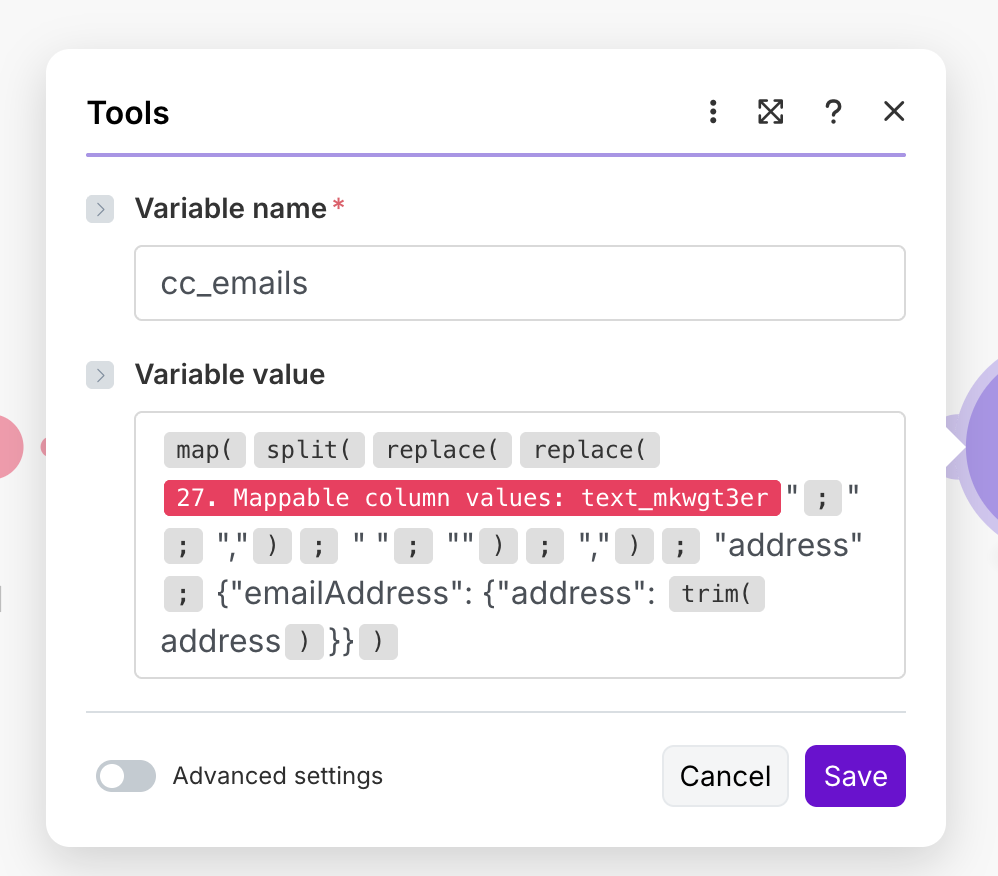
Hey Walter,
that’s a strange looking formula you have with several misplaced “ from first glance. Can you copy paste it here using the Preformatted Text tag (so it retains the Make formula formatting)?

Can you also share some samples of incoming data?
{{ifempty(map(remove(split(replace(replace(27.mappable_column_values.text_mkwgt3er + """;"""; " "",""") + """ """; "") + " "",""") + " """"") + " ""address"""; " {""emailAddress"": {""address"": " + trim("address") + "}}") + "[]")}}
Here you go. Thanks!
I assume its supposed to replace ; with , and then delete empty spaces? Then you are splitting by ,. Then you have another remove but its not finished and you cant use remove on arrays anyway. And finally you are trying to map something but that’s also messy? You also have a lot of unnecessary quotation marks and several of the functions are broken and/or incomplete.
Best suggestion - delete this formula and lets start over. You can use {{split(27.mappable_column_values.text_mkwgt3er; “,”)}} in an iterator, then a text aggregator that rebuilds the list in a semicolon separated one with trim() applied to each value to remove empty spaces.
Is the form at the moment just a text box that the user inputs? Most form creating tools allow you to specify email fields, can you not use those instead? Or have separate short text boxes for each email? Then it will be much easier to build the array.
Reworking free text in a semicolon separated list of emails is tricky and you wont be able to handle all the different use cases with a single formula.
Really appreciate the help, Stoyan. I’m using a SuperForm and have gone as far as to put (separated by ‘;’) in the description, but people still use commas, etc. In this case, I’m trying to fire an email where the applicant used spaces. I’ve tried the iterator/aggregator in the past and have set up your code. This doesn’t account for when someone puts spaces, though, does it?
You can see the mapped emails in the screenshot below, I just need that final tweak and then it should be obvious what to add in the outlook module?
Thanks again – this is clearly my first attempt at a make scenario. Not the easiest…


Yeah if it’s free text then no formula can account for every variation. If they use space, then you need to split by space. And if they mix it up and use different ones then no formula will work.
You can try sending the output to an ai agent and asking it to return the emails in a semicolon separated list. This maybe the easiest and fastest way that will cover the most variants.
Also in the last screenshot deleted the two black quotes and replace the second one with comma.