Using a field to compare data against allowed data

:bullseye: What is your goal?

To compare dates (in the form of integer list (1, 2, 15) etc in a Google spreadsheet against another list of digits in another spreadsheet (holiday and weekend list) and deleting the digits from the original booking spreadsheet (keeping the allowable dates) in the cell.

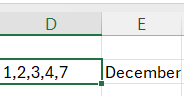
Working example-sheet name: booking request, column D2 contains 1,2,3,4,5,6,7 column E2 contains month December

Spreadsheet name: holiday-weekend contains

Make Automation should compare booking-request cells against holiday-weekend cells and change the booking-request cell to

image

:thinking: What is the problem & what have you tried?

Don’t know where to start

Welcome to the Make community!

I would suggest completing the Make Academy before jumping into building a complete scenario. If you need specific assistance when you are building a scenario it’s easier to help you then.

You can start with this. Use a “Get Range Values” module to retrieve holiday weekends from the first sheet, and another “Search Rows” module to retrieve rows from the main sheet.

For more information about the “Get Range Values” and “Search Rows” modules and the Google Sheets app, see the corresponding Integrations page and the Help Centre documentation.


Here are some useful links and guides you can use to learn more on how to use the Make platform, apps, and app modules. I found these useful when I was learning Make, and hope they might benefit you too —

Learn Make

How-Tos

Hope this helps! If you are still having trouble, please provide more details.

— @samliew

Hey there,

you don’t need Make for any of that. All of this can be done within google sheets directly.

Something like this:

=TEXTJOIN(
“,”,
TRUE,
FILTER(
SPLIT(A1, “,”),
NOT(COUNTIF(SPLIT(B1, “,”), SPLIT(A1, “,”)))
)
)

Will give you a third cleaned cell with the dates removed.

Thanks but not the best help. I am completing Make Academy and know about the range and cells, do I then output them as arrays or text arrays, what about then into json. Does it need two processes, one to read the public holidays and another to read the weekends?

When it finds the disallow dates, do I then need to store these is order that I can use them to notify through an email?

I will try and build but help may be about stripping a lot that doesn’t work rather than supporting me through it

The situation is as follows

person completes google form for dates but the dates are always tick boxes 1 to 31 as the forms dont do dates well.

this is then passed through to the spreadsheet where I want Make to compare two columns in the spreadsheet and make amendments to then send back to the booker (this is already sorted) with the dates they are actually getting.

Are you saying that google sheets can already do the comparisons against the other sheet and then pass the allowable dates into a cell. If that is right, that would be brilliant. The only issue I can see is that all other make scenarios use the column to do automations and I would need to rewrite them all but may be worth the pain.

please confirm above.

Yes. You can 100% compare the two cells within the sheet and produce a third cell with the resulting dates. Its some variation of the formula I wrote in the previous comment.

Depends on how you place/structure the data in the sheet. If you put them in the same range you’ll only need one module to get both “cells”.

I don’t quite get what you mean. Try to build something with the modules I suggested above (“Get Range Values” and “Search Rows”), to get some sample output, then provide additional details.

If you need further assistance with your scenario, please provide the following:

1. All Relevant Screenshots

We need to see what you’re working with to give you the best advice. Screenshots are important because Make is a visual editor — a picture provides us with more context.

It would help us identify the issue by having screenshots of:

  • the full scenario, and the zoomed in parts of the scenario that you are referring to (if your scenario is huge),
  • a full scenario run/execution from the history (showing output “speech” bubbles),
  • relevant module fields (showing how you’ve used any built-in functions, and how you’ve mapped the variables),
  • relevant filters between modules (showing which operators and any built-in functions you’ve used, and how you’ve mapped the variables),
  • relevant module input/output bubbles,
  • if applicable, any error messages,
  • and if applicable, any external services (spreadsheet headers/ sample data/ regex101.com/ etc. to show the item/ record exists, and is set up correctly).
Need help❓View instructions ◀

We would appreciate it if you could directly upload screenshots here instead of linking to them outside of this forum. This allows us to zoom in on the image when clicked, and also having improved privacy from third-party sources.

Taking Screenshots

  • Microsoft Windows: Take screenshots using the “Windows Snipping Tool”, by pressing either PrtSc or WinShiftS keys on your keyboard.
  • MacOS: Take screenshots by pressing CommandShift4 keys on your keyboard.

Uploading Attachments

  • Drag image files directly into the rich-text editor, or
  • Click on the upload button in the editor toolbar to select files:

2. Scenario Blueprint

Providing your scenario will allow others to quickly recreate and see how you have set up the mappings in each module, and also allows us take screenshots or provide module exports of any solutions we have for you in return. This would benefit you in implementing our suggestions as you can view screenshots of the changes or paste corrected modules back into your scenario.

Need help❓View instructions ◀

A. Export Blueprint

In the scenario editor, click the three dots at the top-right, then select “Export blueprint”.

  • You can upload files and images to this forum by clicking on the upload button:

    Uploading a file attachment here will look like this:
    blueprint.json (12.3 KB)

B. Create Public Share Link

In the scenario editor, click on the Share button:

Read more about the scenario sharing feature in the Help Centre.

3. Module Output Bundles

Please provide the output bundles (input bundles are not so crucial) of each of the relevant modules by running the scenario, or get output bundles from a previous scenario run from the “History” tab.

Providing the output bundles will allow others to replicate what is going on in the scenario, especially if there are complex data structures (nested arrays and collections), especially if external services are involved, and help you with mapping the raw property names from collections.

Need help❓View instructions ◀

Click on the white speech bubbles on the top-right of each module and select “Download output bundles”.

A. Upload as a Text File

Save each bundle contents in a plain text editor as a bundle.txt file. Open the file to check if it has not added additional formatting or encoded the plain text.

  • You can upload files and images to this forum by clicking on the upload button:

    Uploading a file attachment here will look like this:
    output-bundle.txt (12.3 KB)

B. Insert as Formatted Code Block

If you are unable to upload files on this forum, alternatively you can paste the bundles AND format them correctly.

:warning: Formatting IS Important! :warning:

Here are some ways to provide text content in a way that it won’t be modified by the forum.

  • Method 1: Type code fence manually —
    Manually type three backticks ``` in a separate line before and after the content, like this,

    ```
    text goes here
    ```
    
  • Method 2: Highlight the pasted content, then click the preformatted text/code button —

  • Method 3: Upload your file elsewhere and share the public link —
    This method is only advised for large files exceeding the forum upload limit.

Sharing these details will make it easier for others to assist you, so that you can get better answers, faster.

Hope this helps! If you are still having trouble, please provide more details.

— @samliew

I have been trying this and to some I think success

This automation retrieves the holiday spreadsheet and compiles the data with JSON as follows:

[
    {
        "weekend": [
            {
                "weekend": "3, 4, 10, 11, 17, 18, 24, 25, 31, 1,2,3,4,5,6 January"
            },
            {
                "weekend": "1, 7, 8, 14, 15, 21, 22, 28, 12,13,14,15,16 February"
            },
            {
                "weekend": "1, 7, 8, 14, 15, 21, 22, 28, 29,  March"
            },
            {
                "weekend": "4, 5, 11, 12, 18, 19, 25, 26, 3,4,5,6,7,8,9,10,11,12,13,14,15,16,17,18,19 April"
            },
            {
                "weekend": "2, 3, 9, 10, 16, 17, 23, 24, 30, 31, 4,25 May"
            },
            {
                "weekend": "6, 7, 13, 14, 20, 21, 27, 28 ,  June"
            },
            {
                "weekend": "4, 5, 11, 12, 18, 19, 25, 26, 2,3,4,5,6,7,8,9,10,11,12,13,14,15,16,17,18,19,20,21,22,23,24,25,26,27,28,29,30,31 July"
            },
            {
                "weekend": "1, 2, 8, 9, 15, 16, 22, 23, 29, 30, 1,2,3,4,5,6,7,8,9,10,11,12,13,14,15,16,17 August"
            },
            {
                "weekend": "5, 6, 12, 13, 19, 20, 26, 27,  September"
            },
            {
                "weekend": "3, 4, 10, 11, 17, 18, 24, 25, 31, 2,3,4,5,6,7,8,9,10,11,12,13,14,15,16,17,18 October"
            },
            {
                "weekend": "1, 7, 8, 14, 15, 21, 22, 28, 29,  November"
            },
            {
                "weekend": "5, 6, 12, 13, 19, 20, 26, 27, 2,3,4,23,24,25,26,27,28,29,30,31 December"
            }
        ]
    }
]

This has parsed the json as a single collection incorporating the Holiday and weekend field and adding the month at the end (in the spreadsheet they are in three different cells)

I then use SEARCH ROWS and filter to current month

Adding a filter

I then want to check the JSON output against the spreadsheet that holds the customer input.

I use does not contain but I believe the issue I am having is I want the search to look at each number in the holidays and compare it against each number in the customer input and (ideally) take a record of the matching entry - I am trying to look for bookings that customers have made that are holiday/weekends and flag this to via email.

I then output the data to a text integrator

at the moment it is only identifying the row and name of parent but it would be good if it also highlighted the holiday/weekend day error.

I am finding the search through cell and find any of the dates in the holiday/weekend and indicate a match.

I am managing to get there a step at a time:

The difficulty I have now is that I have got is as follows:

I want to send all the incorrect data now stored as separate arrays in the Array aggregator

[
    {
        "array": [
            {
                "1": "TEST",
                "2": "TEST",
                "5": "05",
                "6": "December",
                "9": "",
                "10": "",
                "value": "05",
                "__IMTINDEX__": 1,
                "__ROW_NUMBER__": 12
            },
            {
                "1": "GGGG",
                "2": "FFFFF",
                "5": "06, 07, 08",
                "6": "December",
                "9": "",
                "10": "",
                "value": "06",
                "__IMTINDEX__": 2,
                "__ROW_NUMBER__": 13
            },
            {
                "1": "Jane",
                "2": "JULIEN",
                "5": "02, 08",
                "6": "December",
                "9": "",
                "10": "",
                "value": "02",
                "__IMTINDEX__": 9,
                "__ROW_NUMBER__": 10
            },
            {
                "1": "Graeme",
                "2": "YADA",
                "5": "02, 09, 16",
                "6": "December",
                "9": "2, 9, 16",
                "10": "December",
                "value": "02",
                "__IMTINDEX__": 9,
                "__ROW_NUMBER__": 11
            }
        ],
        "__IMTAGGLENGTH__": 4
    }
]

in one email to an address

I therefore compiled it into a text aggregator but it is in a mess of data

[
    {
        "text": "Data includes holidays or weekends: \n{\"array\":[{\"1\":\"TEST\",\"2\":\"TEST\",\"5\":\"05\",\"6\":\"December\",\"9\":\"\",\"10\":\"\",\"value\":\"05\",\"__IMTINDEX__\":1,\"__ROW_NUMBER__\":12},{\"1\":\"GGGG\",\"2\":\"FFFFF\",\"5\":\"06, 07, 08\",\"6\":\"December\",\"9\":\"\",\"10\":\"\",\"value\":\"06\",\"__IMTINDEX__\":2,\"__ROW_NUMBER__\":13},{\"1\":\"Jane\",\"2\":\"JULIEN\",\"5\":\"02, 08\",\"6\":\"December\",\"9\":\"\",\"10\":\"\",\"value\":\"02\",\"__IMTINDEX__\":9,\"__ROW_NUMBER__\":10},{\"1\":\"Graeme\",\"2\":\"YADA\",\"5\":\"02, 09, 16\",\"6\":\"December\",\"9\":\"2, 9, 16\",\"10\":\"December\",\"value\":\"02\",\"__IMTINDEX__\":9,\"__ROW_NUMBER__\":11}],\"__IMTAGGLENGTH__\":4}",
        "__IMTKEY__": "null"]

How do I get this into Outlook in a readable manner ? I am assuming I need to have them converted into fields?

That’s just a single array, not separate arrays.

From your screenshot / output bundle, it appears that you have an array of items. What do you do when you have an array?

“Looping” Through Array Items

When you see an array in a module’s output, think of using an Iterator module. This allows you to individually access and process each item in the array.

In this example, this variable is an array of items (collections). You’ll want to map this variable in an Iterator module.

Question: Have you tried mapping your array variable into an Iterator module, ran the scenario once, and view the output? Then …

Combining Bundles Using Aggregators

Every result/item from some module types (like Trigger / Iterator / List / Search / Match modules) can potentially and likely output more than one bundle. These multiple bundles will individually run subsequent modules once per bundle, which is not optimal in most cases:

  • one operation per bundle per module, which could lead to…
  • use of multiple credits per bundle per module (some modules use more than one credit)
View example screenshots

Aggregator Example

The “Search Rows” module runs one time, returning 999 results (999 bundles).

  • Without Aggregator: the tools module run 999 times (999 operations)


    (and if there are more modules, they run 999 times each)

  • With Aggregator: the tools module only runs 1 time (1 operation)

:warning: Warning: :police_car_light:
This can easily use your entire quota of credits if you are not careful or fail to understand this concept.

To “combine” multiple bundles into a single variable, so that you can process all of the items in a single operation, you’ll need to use an aggregator. Aggregators is a type of module that accumulates bundles and outputs one bundle (unless you are using “Group By”). An example of a commonly-used aggregator module is the Array aggregator module.

You can find out more about some other aggregator modules here:

Question: Which is the best aggregator do you think you’ll need for your use-case?

Example

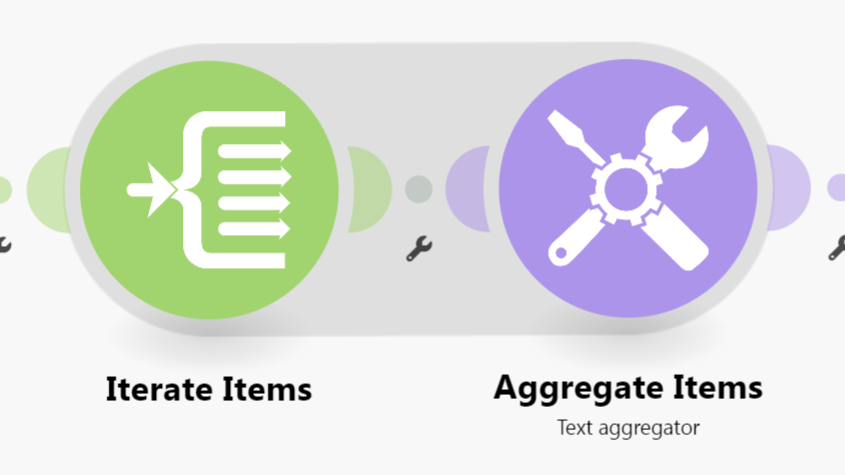
Here is an example of how your scenario could look like:

This is just an example. Your solution may or may not look like this depending on requirements and actual data.

For more information, see “Mapping with arrays” in the Help Centre. I also suggest going through the Make Academy, which also covers the use of Iterators & Aggregators.

Hope this helps! If you are still having trouble, please provide more details.

— @samliew

Thanks for the tutorial.

I feel we are at crossed paths probably because I am using the wrong terminology.

I just need the information in the array shown in my last post to be useable in an email.

At the moment the array lists it as one collection or bundle and in the text aggregator it lists it as one big string.

I need to be able to put this data nicely into a table that says

Row affected. Parent name. Incorrect date requested

Sorry on phone so can’t draw table.

Maybe I need to split up the text aggregator in some way.

Of course the number of strings in out put will vary each time it is run.

I have solved it:

Using advice from above I create an array aggregator, followed by iterator and then Text Aggregator with HTML to extrapolate the data ready for outlook.

Thanks all.

1 Like

That’s exactly what I meant! I even provided a screenshot of it :slight_smile:

Glad I could help with "Using a field to compare data against allowed data"! :slight_smile:

1. Which was the most helpful post in this thread?

The Make Community guidelines encourages users to try to mark helpful replies as solutions to help keep this forum organised. :folded_hands:

This marks the topic as solved, so that others can:

  • save time when browsing the latest activity on the forum, and
  • quickly jump to the solution in this topic

To do this, simply click the checkbox at the bottom of the post that is the most helpful in answering your question.

a screenshot of post menu options at the bottom of each post

:link: Here’s a magic link to a list of your other “unsolved” topics: status:unsolved

2. Have you learnt something new?

Do bookmark this topic so you can easily find and return to this topic in future.

a screenshot of bookmark link at the bottom of the topic

:link: Here’s a magic link to a list of your bookmarks /my/activity/bookmarks

3. Have a different/follow-up question? Start a new topic.

Creating a new topic for each question makes it easier for others with the same problem to search for answers. You are also more likely to receive help sooner as new topics are displayed first on the forum’s “new” page!

If you have a follow-up question, please start a new thread. Thanks!

— @samliew