My Goal with the automation is that when a page is edited, it goes in and deletes the page content of a related page, and then updates it with the edited content from the trigger page.
Trigger page (page content edited) → Goes and deletes related pages’ (page content)→ Then updates the page content of the related page (i.e, copy pastes trigger page content).
Everything else is working fine, but I can’t figure out the updating the page content part…
(About the page content - it will have a Callout box, some text, or image/PDF, or links.)
Can someone help me with this, please? . What should I do here, it’s pretty urget can you help me please??
So you want to recreate the whole page layout completely dynamically based on another page’s content?
If that’s even possible (I would have to dig into the API docs to see if all types of blocks are supported in Notion API- I’m pretty sure there are some missing options), it will require handling data using iterators + aggregators and most likely custom requests using “Make an API Call modules” to make life easier, or even custom code to parse everything smoothly.
I’m aware that this won’t be a task for a beginner, and especially not under time pressure. It’s definitely more complex than it looks at first glance.
This is just an example. Your final solution may or may not look like this depending on your requirements.
I would suggest completing the Make Academy before jumping into building a complete scenario. If you need specific assistance when you are building a scenario it’s easier to help you then.
Here are some useful links and guides you can use to learn more on how to use the Make platform, apps, and app modules. I found these useful when I was learning Make, and hope they might benefit you too —
You can use the Hire a Pro category to request for private 1-to-1 assistance via video call/screenshare/private messaging/etc. This may help you get your issue resolved faster especially if it is urgent or contain sensitive information. It is important to post your request in the Hire a Pro category, as forum members are not allowed to advertise their services in other categories like here (even if it’s free/unpaid). Posting in the Hire a Pro category will allow other members to assist you over other forms of communication.
How to Message Another User
You can use the private messaging feature to directly reach out to other forum members. To do this, go to your inbox, and click on the “New Message” button on the right.
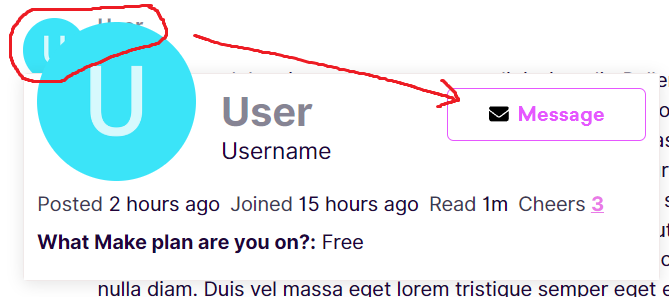
Alternatively, you can also click on clicking on their username/avatar, then click on the “Message” button in the popup card.
Could you please share with the Make community as to what you did to get it working? You can also then mark your solution as an answer to help keep this forum organised. Sharing your solution will help others with the same problem in future. Thanks!
 . What should I do here, it’s pretty urget can you help me please??


 How to schedule scenario for first Monday next month (recurring)
 Automate Follow-Up of Email Leads a Week After